
You’re standing by your car, pressing the unlock button, and… nothing happens.
A dead key fob is frustrating, but heading to the dealership to fix it is even worse. They often charge upwards of $100 for a service that takes less than five minutes.
As a remote expert at KeylessBest, I know that swapping a battery is the easiest DIY task a car owner can do.
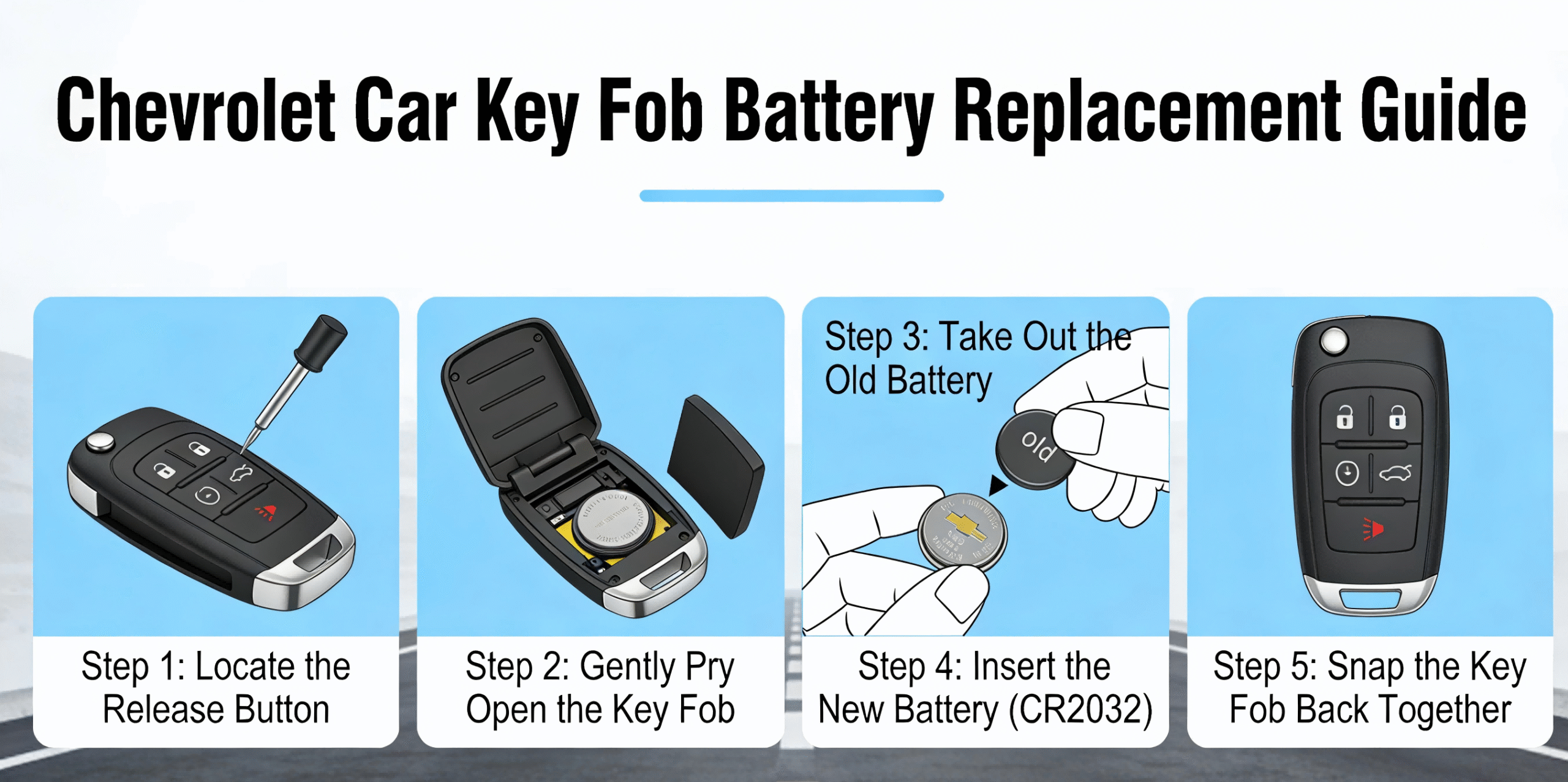
In this guide, you’re going to learn exactly how to replace the battery in a Chevrolet car key fob, covering everything from modern Smart Keys to classic Flip Keys.
We’ll cover the specific tools you need, the correct batterie CR2032 placement, and how to check your ID FCC to ensure your remote stays functional.
Let’s get your key working again.
Preparation: What You Need Before You Start
Identifying Your Battery Type (CR2032 vs. CR2016)
We know that a dead remote is a hassle, but fixing it shouldn’t be. Before you start prying things open, let’s make sure you have the right components. Most Chevrolet remotes—whether it’s for a Silverado or a Malibu—use a standard Chevy key fob battery type CR2032. However, some slimmer smart keys require a CR2016. Always double-check the number stamped on your old battery before buying a replacement to ensure it fits the contact points securely.
Required Tools for the Job
You don’t need expensive equipment or a trip to the dealership for this DIY remplacement de télécommande d'entrée sans clé. Here is the simple toolkit we recommend:
- Small Flathead Screwdriver: Essential for gently separating the fob halves.
- Precision Pry Tool: A plastic tool is best if you want to avoid scratching or cracking the plastic case.
- Clean Cloth: Use this to handle the new battery, as skin oils can reduce battery life.
Checking the FCC ID for Compatibility
At KeylessBest, we stress the importance of FCC ID key fob matching. Flip your remote over and look for the FCC ID code on the back of the case. If the text is worn off due to daily use, you might find it printed inside the shell once opened. Matching this code ensures you are working with the correct hardware for your specific vehicle, guaranteeing that your new battery or replacement shell fits perfectly. If you ever need a full replacement, this ID is the key to finding the right part in our inventory.
Guide: The Smart Key Fob (Tahoe, Suburban, Silverado, Malibu)
If you drive a newer model like a Tahoe, Suburban, or are performing a Silverado key fob battery replacement, you likely have the “Smart Key” or proximity remote. These remotes allow for push-to-start functionality and require a specific opening method to avoid damaging the internal electronics.
Removing the Physical Emergency Key
First, locate the chrome or small plastic button on the side of the remote. This is the emergency key release button. Press it down firmly while pulling on the keyring loop. The physical metal key blade will slide out of the bottom of the fob. This step is crucial for accessing the internal components of any Chevy Malibu proximity key or similar smart remote.
Prying Open the Case Safely
With the physical key removed, look into the open slot. You will see a small indentation specifically designed for prying.
- Insert the tip of the emergency key or a small flathead screwdriver into this slot.
- Gently twist the tool—do not pry aggressively.
- The two halves of the plastic shell will pop apart, revealing the circuit board and battery.
Swapping the Battery and Checking Orientation
Most of these units utilize the Chevy key fob battery type CR2032. Carefully lift the old battery out using a non-conductive tool to avoid shorting the contacts. Place the new battery into the slot.
- Important: Assurez-vous que le positive (+) side is facing up (towards you).
- Check that the battery is seated flat against the contacts.
Snapping the Case Shut and Testing
Align the back cover with the front of the fob and press them together until you hear a distinct snapping sound around the edges. Slide the emergency key back into its slot until it clicks into place. Walk to your vehicle and press the lock button to test the key fob signal range. If the vehicle responds immediately, the replacement was successful. If you experience issues, our Free Technical Support team is available to help troubleshoot.
Guide: The Flip Key Fob (Equinox, Camaro, Sonic)
If you drive a Chevy Equinox, Camaro, Cruze, or Sonic, you likely have the “switchblade” style remote. Learning how to open Chevy flip key models requires a specific technique to avoid damaging the spring mechanism or the plastic shell.
Extending the Key Blade
Start by pressing the silver chrome button to flip the metal key blade out. You cannot access the internal components while the key is tucked away. Once the key is extended, look into the empty slot where the blade usually sits to find the access point.
Locating the Pry Point and Separating Halves
Inside the key slot, you will see a small seam or wall separating the battery cover from the main body.
- Insert Tool: Place a small flathead screwdriver into the gap near the key hinge.
- Twist Gently: Apply leverage to pop the battery cover off the back.
- Check the Shell: If the plastic tabs snap due to age or brittleness, we stock KeylessBest replacement remotes and empty shells to fix the housing cheaply.
Replacing the Battery and Realigning the Pad
Remove the dead battery and verify the replacement. These units almost always use the Chevy key fob battery type CR2032.
- Slide the new battery in with the positive (+) side facing up.
- Check the rubber button pad; if it shifts during this process, your buttons won’t make contact with the circuit board.
- If the pad is misaligned, you might think your Equinox remote start is not working, when it is actually just a physical obstruction.
- Snap the back cover firmly onto the remote until you hear it click into place.
Standard Keyless Entry Remote Battery Replacement (Older Impala, Traverse)
If you are driving an older model like a Chevy Impala or Traverse, you likely have the standard black remote with rubber buttons. These units are workhorses, but eventually, you will need to perform a remplacement de la pile de la télécommande. Since these remotes don’t have a flip-out key, the opening process is slightly different but still very straightforward.
Finding the Notch and Using the Coin Twist Technique
Unlike the newer smart keys, these standard remotes usually rely on a simple snap-fit design.
- Locate the Indentation: Look along the side seam or the bottom corner of the fob for a small slot.
- The Coin Twist: Take a quarter or a wide flathead screwdriver and insert it into that notch.
- Twist Firmly: Give the tool a quick twist. The two halves of the plastic shell should pop apart with a distinct click.
Handling the Circuit Board with Care
Once the case is open, you will see the green circuit board and the rubber button pad. In many of these older remplacement de télécommande d'entrée sans clé units, the board isn’t screwed down.
- Avoid Contact: Try not to touch the gold contacts or the black chips on the board. The oils from your fingers can cause corrosion or connectivity issues later.
- Check the Buttons: If the rubber buttons are torn or the plastic case is cracked, now is the best time to swap the internal electronics into a new shell from our inventory.
Battery Swap and Final Closure
Most of these standard remotes utilize the Chevy key fob battery type CR2032.
- Remove the Old Battery: Slide the dead battery out from under the metal retaining clip.
- Insert the New Battery: Place the fresh battery in, ensuring the Positive (+) side is facing up.
- Snap it Shut: Realign the rubber pad and the circuit board, place the back cover on top, and squeeze the halves together until they snap securely.
- Test: Press the lock button to ensure the signal is transmitting. If it doesn’t work immediately, double-check that the battery is seated correctly.
Troubleshooting: What If a New Battery Doesn’t Work?
It is incredibly frustrating when you complete a remplacement de la pile de la télécommande only to find the remote is still unresponsive. Before you assume the worst, there are a few common issues that are easy to fix. If your Chevy key fob battery type CR2032 is fresh out of the package but nothing is happening, run through this quick checklist.
Checking Battery Polarity
The most common mistake is simply installing the battery upside down. Re-open the case and look closely at the metal contacts.
- Positive Side Up: In most Chevrolet remotes, the positive (+) side of the battery should face up or away from the circuit board.
- Seating: Ensure the battery is snapped firmly into the holder. If it’s loose, the connection won’t hold.
Cleaning Corroded Contacts
If your old battery leaked or if moisture got inside the shell, the metal contacts might be dirty. This prevents the new battery from powering the remplacement de télécommande d'entrée sans clé.
- Take a cotton swab dipped in a tiny amount of rubbing alcohol.
- Gently wipe the metal tabs where the battery touches.
- Let it dry completely before reassembling.
Resyncing the Remote
Sometimes, removing the battery causes the fob to lose synchronization with the vehicle. You might need to resync the Chevy remote to get them talking again.
- Quick Fix: Try standing near the vehicle and holding the “Lock” and “Unlock” buttons simultaneously for about 7-10 seconds.
- Tech Support: If that doesn’t work, remember that at KeylessBest, we offer Free Technical Support. We can guide you through specific resync procedures for your exact model.
Identifying Internal Hardware Failure
If the battery is good and the contacts are clean, but you still have dead key fob symptoms, the internal circuit board (PCB) might be damaged. Buttons can wear out, and water damage can fry the electronics. At this point, a battery swap won’t save it. You likely need a full replacement. We stock high-quality, KeylessBest replacement remotes that are tested to ensure reliability, backed by our 180-Day Money-Back Guarantee.
When to Buy a Replacement Fob
Sometimes, a fresh battery isn’t enough to bring your remote back to life. If your Chevy key fob has suffered physical damage, water exposure, or severe wear, it is time to stop troubleshooting and start replacing. At KeylessBest, we provide high-quality KeylessBest replacement remotes that function just like the original equipment but without the steep price tag.
Recognizing Wear and Tear
Physical degradation is the most common reason a télécommande d'entrée sans clé fails aside from battery issues. If you notice the following dead key fob symptoms, you likely need a full replacement or a new shell:
- Cracked Casing: If the plastic shell is broken, moisture and dust can destroy the internal electronics.
- Stuck Buttons: Buttons that feel mushy or don’t “click” usually indicate the contact pads underneath are worn out.
- Rattling Sound: If you hear loose parts inside the fob, the circuit board or battery bracket has likely detached.
Cost Comparison: Dealership vs. DIY
Many drivers assume they have to go back to the dealership for aftermarket car key fobs, but that is the most expensive route. Dealers often charge for the part plus an hour of labor for programming. By choosing a DIY solution from us, you get the same functionality for a fraction of the cost.
Price and Convenience Breakdown
| Fonctionnalité | Concessionnaire | KeylessBest DIY |
|---|---|---|
| Part Cost | High (MSRP) | Wholesale / Discount |
| Programmation | Paid Service Appointment | DIY / Locksmith Ready |
| Garantie | Varie | 180-Day Money-Back Guarantee |
| Disponibilité | Souvent en rupture de stock | Fast & Free Shipping |
Matching FCC ID and Part Numbers
To ensure your new remote works with your specific Chevrolet, you must perform FCC ID key fob matching. You cannot simply buy a remote because it looks like your old one; the internal frequency (315MHz or 433MHz) must match exactly.
How to find your FCC ID:
- Look at the back of your current remote case.
- Find the code labeled ID FCC (e.g., OUC60270 or LHJ011).
- Enter this code into the search bar on our site to find the guaranteed compatible part.
If your case is worn off, you can also look up your vehicle by Year, Make, and Model. We prioritize compatibility assurance so you don’t waste time with the wrong part.
Frequently Asked Questions (FAQ)
Will Changing the Battery Reset My Key Fob?
In most cases, swapping out the power source won’t wipe your programming. Your vehicle’s computer is designed to remember the specific FCC ID key fob matching codes even when the battery is removed for a minute or two. However, if the remote sits without power for a long time, it might lose sync. If that happens, don’t worry—we offer free technical support to help you get your KeylessBest replacement remotes or original fobs communicating with your car again.
How Do I Start My Chevy If the Key Fob Is Totally Dead?
If you are experiencing dead key fob symptoms and can’t unlock the car, use the emergency key release button on the side of the remote to slide out the physical key blade. Once inside, you can still start the engine.
- For Push-to-Start: Place the dead fob directly against the Start/Stop button or in the designated transmitter pocket (often found in the cupholder or center console).
- For Turn-Key: Le clé transpondeur chip inside the shell works passively, so just insert the key and turn.
Where Can I Buy a CR2032 Battery?
Le Chevy key fob battery type CR2032 is standard and available at most local hardware or grocery stores. However, quality varies. When you buy aftermarket car key fobs or replacement shells from us, we prioritize compatibility and longevity. Always ensure you are using a fresh, high-quality battery to maintain the best key fob signal range and reliability.
