
Signs Your Land Rover Key Fob Battery Needs Replacing
Recognizing the early warning signs of a dying battery is the best way to avoid being stranded or relying on manual entry. Your vehicle is engineered to monitor the health of your remote, providing clear indicators when a Land Rover key fob battery replacement is necessary.
Dashboard Alerts and Range Issues
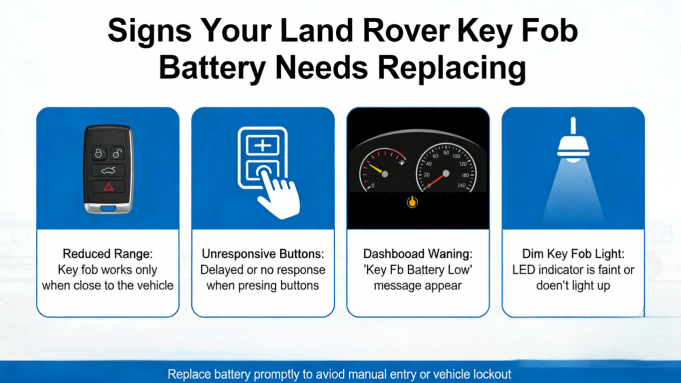
The most common sign is the ‘SMART KEY BATTERY LOW’ message appearing on your instrument cluster. This is your primary cue to change your Land Rover smart key battery before the unit fails entirely. Beyond the digital warning, you may notice:
- Reduced Signal Range: You find yourself needing to be significantly closer to the vehicle for the lock or unlock functions to trigger.
- Intermittent Unresponsiveness: Buttons require multiple presses or a specific angle to function correctly.
- Passive Entry Failure: The vehicle no longer unlocks automatically as you approach the door handle, indicating the fob’s “handshake” signal is too weak.
Complete Remote Failure
If you ignore the initial warnings, the remote will eventually stop sending signals altogether. However, a dead battery doesn’t mean you are locked out.
- Emergency Key Blade: Even when the electronics fail, the Land Rover key fob emergency key blade remains functional for manual door unlocking.
- Proximity Starting: Most models allow you to start the engine by holding the dead fob against a specific point on the steering column, but this is a temporary fix.
Seeing these symptoms is a clear signal that it is time for a Land Rover key fob battery change. Addressing a Land Rover key fob battery low status early ensures your luxury driving experience remains seamless and convenient.
Tools for Land Rover Key Fob Battery Replacement
Performing a Land Rover key fob battery replacement is a quick task that requires very little equipment. Having these items ready ensures you won’t damage the plastic casing or the sensitive internal circuit board.
Necessary Materials
- CR2032 3V Lithium Battery: This is the standard CR2032 battery for Land Rover key fob models. For 2–3x longer life, I recommend opting for a premium graphene battery for car key fob.
- Prying Tool: A small flathead screwdriver works in a pinch, but a plastic pry tool is the best way to open Land Rover key fob housings without leaving permanent scratches.
- Clean Cloth or Gloves: Use these to handle the new battery. Finger oils can transfer to the metal, leading to contact corrosion and a weaker signal over time.
Just like maintaining a 2008-2010 Jeep Commander key fob, keeping your Land Rover’s hardware clean during the swap is the secret to a long-lasting, reliable remote.
Step-by-Step Land Rover Key Fob Battery Replacement
I’ve found that most owners can change a Land Rover smart key battery in under five minutes. Following a specific order ensures you don’t snap the delicate plastic housing or misalign the internal components.
Accessing the Battery Compartment
First, you need to release the emergency key blade. On most modern fobs, there is a small button or slide-lock on the side; press this and pull the metal blade out.
To open the casing, I recommend using the tip of the metal blade itself. Insert it into the notch revealed after removing the blade and twist gently. You should feel the two halves of the fob start to separate. Avoid using a large screwdriver, as this often gouges the plastic.
The Battery Swap Process
Once the case is open, you will see the circular battery (typically a CR2032).
- Removal: Carefully slide the old battery out. I suggest using a wooden toothpick or a plastic tool to avoid scratching the circuit board.
- Installation: Slide the new battery into the housing. It is critical to place the battery positive side up (the side with the “+” sign and brand markings must face you).
- Cleaning: Before closing, I always wipe the contact points with a dry cloth to ensure a perfect connection.
Note: Do not touch the flat surfaces of the new battery with your bare fingers if possible. Skin oils can cause minor corrosion over time, potentially shortening the battery life.
Reassembly and Remote Testing
Line up the two halves of the key fob and press them together firmly. You should hear a series of “clicks” as the plastic tabs lock back into place. Reinsert the emergency key blade until it clicks into its locked position.
ly, I suggest testing the Land Rover key fob battery replacement by standing a few yards from the vehicle. Press the unlock button; the hazard lights should flash, and the mirrors should unfold (if equipped). If the fob remains unresponsive despite the new battery, you may need to visit a professional service location to check for underlying electronic faults or signal interference.
Land Rover Key Fob Variations by Model Year
The Land Rover key fob battery replacement process varies depending on the generation of your vehicle. While the 3V coin battery is standard, the way you access the internal compartment changes significantly across different Discovery, Range Rover, and Defender models.
2018–Present: Defender, Discovery, Velar, & Evoque
Newer smart keys feature a sleek, tool-less entry design. When performing a Land Rover Defender smart key battery change, the focus is on sliding rather than prying.
- Access: Press the release button to slide out the emergency key blade.
- Opening: Use the tip of the emergency blade or a plastic tool to slide the back cover panel off the fob body.
- Care Tip: The high-gloss finish on these fobs is prone to scuffs, so avoid using metal screwdrivers on the exterior casing.
2010–2017: LR4 & Range Rover Sport
A Range Rover key fob battery change for this generation typically involves a prying notch located under the side trim.
- Prying Point: Look for the small slot inside the cavity where the emergency key is stored.
- Method: Insert a small flathead tool into the notch and twist gently to separate the two halves of the casing.
- Reassembly: Ensure the battery contact points are clean before snapping the silver side trim back into its original position.
Pre-2010 Models and Early Discovery
The Land Rover Discovery key fob battery for older vehicles is housed in a more traditional, rugged clamshell case. These older plastics can become brittle with age, especially on a vehicle from 2007 or earlier.
- Design: These fobs usually have a clear seam running along the entire edge.
- Opening: Apply steady, even pressure along the seam to avoid snapping the internal plastic tabs.
- Maintenance: Since these older models often see heavy off-road use, check the internal rubber seal for any debris or moisture that could cause a short circuit.
Troubleshooting Common Land Rover Key Fob Issues
If your remote is still acting up after a Land Rover key fob battery replacement, don’t worry. Electronics can be finicky, but most problems are solved with a quick double-check of the internal assembly.
Key Fob Not Working After Battery Change
- Verify Orientation: Ensure the battery is installed with the positive (+) side up. Reversing the polarity is the most frequent cause of a dead remote.
- Battery Quality: If you didn’t use a high-quality 3V coin battery, the voltage might be insufficient for the transmitter to communicate with the vehicle.
- Contact Issues: Make sure the internal metal tabs are making firm contact with the battery surface. If they look flattened, I suggest gently nudging them up to improve the connection.
Persistent ‘SMART KEY BATTERY LOW’ Message
Your dashboard might still show the low battery warning even with a fresh cell. To clear the system:
- Sync the Remote: Stand near the vehicle and press the lock and unlock buttons several times to reset the communication link.
- Ignition Cycle: Start the engine and let it run for a moment to allow the vehicle’s computer to register the updated voltage levels from the smart key.
Case Realignment and Damage Prevention
- Don’t Force the Case: If the fob won’t snap shut easily, the emergency key blade or the battery is likely misaligned. Forcing the halves together can permanently damage the sensitive internal plastic tabs.
- Prevent Scratches: I always recommend using a plastic pry tool to protect the casing. If a flathead screwdriver is your only option, wrap the tip in a microfiber cloth to avoid scratching the fob’s exterior finish.
Tips to Extend Your Land Rover Key Fob Battery Life
Knowing how to replace battery in a Land Rover key fob is a great skill, but making that battery last as long as possible is even better. I recommend following these maintenance habits to ensure your CR2032 battery for Land Rover key fob stays strong for years rather than months.
Maintenance and Storage Best Practices
- Avoid Temperature Extremes: Never store your spare keys in a freezing garage or a hot glove box. Extreme heat and cold accelerate the chemical depletion of the battery cells.
- Prevent Contact Corrosion: When you change Land Rover smart key battery, avoid touching the flat surfaces of the new battery with your bare fingers. Skin oils can lead to corrosion and poor connectivity. Use a clean cloth or wear gloves during the swap.
- Choose Graphene Technology: For maximum longevity, I suggest opting for a premium graphene battery for car key fob. These specialized cells often provide 2–3x the lifespan of standard lithium batteries, reducing the frequency of maintenance.
- Regular Range Testing: Periodically test your remote functions from a distance. If the range starts to dip, it is a clear indicator that the voltage is dropping, even before the dashboard alert appears.
If your remote housing is cracked or the buttons are physically worn out, you can find durable replacements in our keylessbest key fob category to keep your entry system looking and performing like new. Consistent care and high-quality components are the best defense against being locked out of your vehicle.
Professional Help and Full Fob Replacement
Sometimes a Land Rover key fob battery replacement isn’t the cure-all. If you’ve swapped the cell and the vehicle still won’t respond or the dashboard alert remains, the issue likely sits within the internal electronics or the physical housing.
When DIY Fixes Fail
- Internal Circuit Failure: If your Land Rover key fob is not working after battery installation, moisture or age may have corroded the circuit board.
- Worn Button Actuators: If you no longer feel a tactile “click” when pressing the lock or unlock icons, the internal micro-switches have likely failed, necessitating a full remote replacement.
- Shell Damage: A cracked or compromised casing can allow debris to interfere with the battery contacts, eventually killing the transmitter.
When repairs are no longer viable, I recommend upgrading to a new, compatible smart key. Sourcing your replacement remote from a trusted provider like Keylessbest ensures you receive a reliable, high-quality device without the steep dealership markups. If you are dealing with persistent electronics faults, a fresh start with a new fob is the most dependable way to ensure your Land Rover remains accessible and secure.
Frequently Asked Questions About Land Rover Key Fob Battery Replacement
Can I use any CR2032 battery with my Land Rover key fob?
Yes, any standard 3V lithium coin cell will work, but I recommend high-quality brands or graphene batteries for a longer lifespan. Low-grade batteries often trigger the SMART KEY BATTERY LOW message sooner than expected because they struggle with consistent voltage delivery.
Is programming required after changing the battery?
No. A simple Land Rover key fob battery replacement does not require reprogramming. Your vehicle stores the key’s coding independently of the battery power. Once you change Land Rover smart key battery components and snap the case shut, the remote should function immediately.
How do I avoid damaging the key fob case when opening it?
The best way to avoid scratching Land Rover key fob case plastic is to use a dedicated plastic pry tool or a guitar pick. If you must use the emergency key blade to open the fob, insert it into the designated notch and twist gently. Applying excessive force can snap the internal plastic tabs.
What do I do if the key fob doesn’t work after replacing the battery?
If you’ve completed a DIY Land Rover key fob battery replacement and the remote is unresponsive, check the following:
- Orientation: Confirm the battery is installed positive side up.
- Clean Contacts: Ensure the internal metal tabs are clean and making firm contact with the battery surface.
- Battery Voltage: Ensure the new battery isn’t a “dud” by testing it with a multimeter.
Are graphene batteries really better for key fobs?
In my experience, yes. Graphene batteries for car key fobs offer superior energy density and handle the temperature extremes common in the United States better than standard lithium cells. They typically provide 2–3 times the lifespan, keeping your Land Rover smart key battery functional for much longer.
