
Identification: Which Accord Key Do You Have?
Before we rush into the replacement process, we need to confirm exactly which remote you are holding. The Honda Accord was a transitional model, meaning it shipped with two very different key styles depending on your trim level (LX, Sport, EX, or Touring). Buying the wrong Honda Accord key fob battery is a common mistake, but it is easily avoided by a quick visual check.
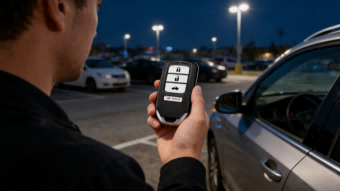
Type A: The Smart Key (Driver 1 / Driver 2)
This is the proximity remote found on higher trims equipped with Push-to-Start ignitions. If you can start your car while the key is still in your pocket or purse, this is the one you have.
- Visual Check: It has an oval, rounded shape with silver buttons.
- Feature: The back often features a “Driver 1” or “Driver 2” memory label.
- Emergency Key: It contains a hidden slide-out emergency blade, but the blade is not used to start the engine daily.
Type B: The Pearl/Blade Key (Physical Key)
This is the standard key found on the LX and Sport trims. It requires you to physically insert the metal blade into the ignition switch to start the vehicle.
- Visual Check: The remote buttons (Lock, Unlock, Trunk, Panic) are integrated directly into the plastic head of the metal key blade.
- Feature: It usually has a small screw on the back of the plastic shell.
Identifying the Correct Battery Type (CR2032 vs CR1620)
Once you have identified your key shell, selecting the right power source from our inventory is simple. We carry premium, sustainably sourced button batteries for both styles to ensure your remote signal stays strong.
- For Type A (Smart Key): Você precisa de um CR2032 battery. This is a wider, coin-sized lithium battery common in most modern proximity fobs.
- For Type B (Physical Blade Key): You likely need a CR1620 battery. This is slightly smaller and thicker than the coin cells found in smart keys.
Pro Tip: Always double-check the number stamped on your old battery before ordering. If your shell is damaged or the buttons are worn out, we also stock high-quality replacement shells and transponder keys to give your remote a brand-new look and feel.
Step-by-Step: How to Replace the Honda Accord Smart Key Battery (Type A)
If you are driving a model equipped with push-to-start, you likely have the “Smart Key” fob. This remote usually features chrome sides and buttons for lock, unlock, trunk, and panic (sometimes remote start). Replacing the battery here is straightforward and doesn’t require heavy-duty tools.
Tools Needed for Smart Key
- A small flathead screwdriver (or a coin in a pinch).
- A fresh CR2032 button battery.
- A soft cloth (optional, to prevent scratching the plastic).
Step 1: Release the Emergency Key
Look at the back of your fob. You will see a small slide or tab. Slide this release tab over and pull on the silver loop at the top. This will release the emergency physical key blade from the remote body. Set the key blade aside; you will need it in a moment.
Step 2: The Twist Technique
Once the metal key is removed, look into the slot where the key used to be. You will notice two distinct grooves. One is the deep slot for the key blade, and the other is a shallow notch right in the center of the two plastic halves.
Take the tip of your emergency key (or a flathead screwdriver wrapped in a cloth) and insert it into that shallow notch. Twist it gently like you are turning a doorknob. The two halves of the plastic shell will pop apart.
Step 3: Swap the Battery
With the shell open, you will see the circuit board and the battery. Note the orientation—the positive (+) side should be facing up. Carefully pop the old battery out using your fingernail or a small tool.
Place your new CR2032 battery into the slot. Ensure it is seated firmly. If you damage the plastic housing during this process, we offer high-quality replacement shells that are compatible with Honda models to get your remote looking new again.
Step 4: Snap it Shut
Align the two halves of the fob carefully. Press them together until you hear a solid “snap” all the way around the perimeter. Finally, slide your emergency key blade back into its slot until it clicks into place. Test the buttons near your vehicle to ensure the signal is strong.
Step-by-Step: How to Replace the Standard Remote Key Battery (Type B)
If you are rocking the standard “blade” key—the one you actually have to insert into the ignition—the process is slightly different than the smart key. This style, often used on the LX or Sport trims without push-to-start, usually requires a CR1620 battery, though you should always verify what’s inside your specific remote first.
Tools Needed for Standard Key
- Precision Phillips Screwdriver: You need a very small screwdriver (size #0 or #00) because there is a tiny screw holding the shell together.
- Small Flathead Screwdriver: For prying the module open.
- Replacement Battery: Typically a CR1620 coin cell.
Step 1: Remove the Screw
Look at the back of your key fob. Near the bottom, where the key ring loop is, you will see a very small screw. Use your precision Phillips screwdriver to carefully back this screw out. Put it somewhere safe immediately—these are incredibly easy to lose in a carpet.
Step 2: Open the Shell
Once the screw is out, the back cover won’t just fall off. You need to use a flathead screwdriver or a strong fingernail to pry the two halves of the plastic shell apart. Insert your tool into the seam on the side and twist gently until you hear a pop.
Step 3: Remove the Internal Module
Unlike the smart key, the buttons and electronics in this version are contained in a separate internal “module” or “pod.” Once the shell is open, lift this entire module out. The buttons are on the front, and the battery access is on the back of this pod.
Step 4: Battery Swap
You aren’t done yet—you have to open the module itself. There are usually two small tabs holding the back of the module on. Use your flathead tool or a coin to pop these tabs. Once open, the old battery will be exposed. Note the orientation (positive side usually faces up) and swap in your fresh CR1620. Snap the module back together, place it back into the key shell, and screw everything tight.
If you find that your shell is cracked or the screw hole is stripped during this process, it might be time for a full replacement. We stock high-quality chaves de controle Ford and other major brands if you have other vehicles in the household needing attention, ensuring all your family’s cars are road-ready.
Troubleshooting: What If It Still Doesn’t Work?
You’ve followed the steps, swapped the 2017 Honda Accord key fob battery, and… nothing. The car still won’t unlock, or the dashboard is still flashing that annoying Aviso de bateria fraca do controle remoto. Before you panic and call a locksmith, let’s run through a quick checklist. Usually, the fix is simpler than you think.
Check Polarity
This is the most common mistake I see. It is incredibly easy to put a button cell battery in upside down.
- For the Smart Key (Type A): Ensure the positive (+) side with the writing is facing up towards you.
- For the Pearl/Blade Key (Type B): Double-check the markings inside the plastic module.
If the battery is flipped, the remote won’t get any power, mimicking dead key fob symptoms.
Clean Contacts
Sometimes, invisible oils from our fingers or slight corrosion can block the electrical connection. Even a brand-new CR2032 lithium battery won’t work if it can’t touch the metal properly.
- Take a cotton swab with a tiny bit of rubbing alcohol.
- Gently wipe the metal contact points inside the remote and the battery surface itself.
- Let it dry completely before snapping the case back together.
Broken Shell/Buttons
If the buttons feel mushy or don’t “click,” the problem might not be the battery at all. Over time, the rubber pads inside the Honda key shell replacement can wear out, or the plastic casing can crack, preventing the button from making contact with the circuit board. If your shell is falling apart, simply replacing the battery won’t fix the mechanical issue—you might need a new shell case.
Dead Transponder/Chip
If the red light on your fob flashes when you press a button, but the car doesn’t respond, or if the car won’t start even with the fob right next to the Honda Accord push to start button, the internal transponder chip might be damaged. This is rare, but it happens if the key was dropped in water or on hard concrete. In this scenario, a simple battery change won’t help.
Frequently Asked Questions (FAQ)
Do I need to reprogram my key after changing the battery?
Na maioria dos casos, no. Changing the 2017 Honda Accord key fob battery is strictly a maintenance task that does not wipe the memory of the internal transponder chip. Your vehicle should recognize the remote immediately after you snap the shell back together. However, if you find that the buttons aren’t responding, double-check that the battery polarity is correct. If you still have issues, our 24/7 online customer support is available to help you troubleshoot.
How long does the battery last?
Um produto de alta qualidade CR2032 lithium battery or CR1620 typically lasts between 2 to 3 years. However, lifespan varies based on usage. If you have the Smart Entry remote (Keyless Go), the fob is constantly communicating with your Accord’s sensors, which drains power faster than a standard blade key. We recommend keeping a spare battery from our premium inventory on hand so you aren’t caught off guard.
Why does my dashboard still say Low Battery?
It can be frustrating to see the warning light persist after installing a new 2017 Honda Accord remote key battery 3V. Here are the most common reasons:
- System Reset Lag: The vehicle sometimes requires a few start cycles to recognize the new voltage level.
- Poor Connection: Finger oils on the battery surface can create resistance. We suggest wiping the battery with a clean cloth before installation.
- Low-Quality Cells: Not all batteries are created equal. Generic store-bought batteries may sit on shelves for years, losing charge. At KeylessBest, we ensure our button batteries are fresh and tested for peak performance.
Why Choose Keylessbest for Your Replacement?
Quando você precisar de um 2017 Honda Accord key fob battery or a completely new remote, you shouldn’t have to guess about quality. At KeylessBest, we aren’t just a middleman; we are a professional car key manufacturer. We operate our own specialized factories and production lines to ensure every button battery and key shell meets strict standards before it reaches your mailbox.
We built our platform to solve the headaches of dealership prices and unreliable aftermarket parts. Here is why American drivers trust us with their automotive electronics:
| Recurso | Benefit to You |
|---|---|
| Professional Grade | Manufacturer-direct quality means you get durable, reliable components without the markup. |
| Peace of Mind | We offer an industry-leading Up to 2 Years Premium Warranty e 365 Days Easy Free Return. If it doesn’t work, we fix it. |
| Sustainable | Our products use sustainably sourced components to reduce environmental impact without sacrificing durability. |
| Suporte 24/7 | Stuck on installation? Our 24/7 Online Customer Support is ready to help you safeguard your journey. |
Whether you are swapping out a dead CR2032 or buying a backup transponder key, we make the process risk-free. Plus, with Entrega Fácil e Grátis on qualifying orders, getting your Honda back on the road is both affordable and fast.
Fontes Relacionadas
