
The Secret Code on Your Key Fob
You found a replacement key that looks identical to your old one—same buttons, same shape, same logo. But when you try to pair it, nothing happens. This is the most common frustration we see at KeylessBest, and the culprit is almost always a mismatched FCC ID. Think of this alphanumeric code as your key’s unique fingerprint; without it, even a visually perfect match is just a hollow shell.
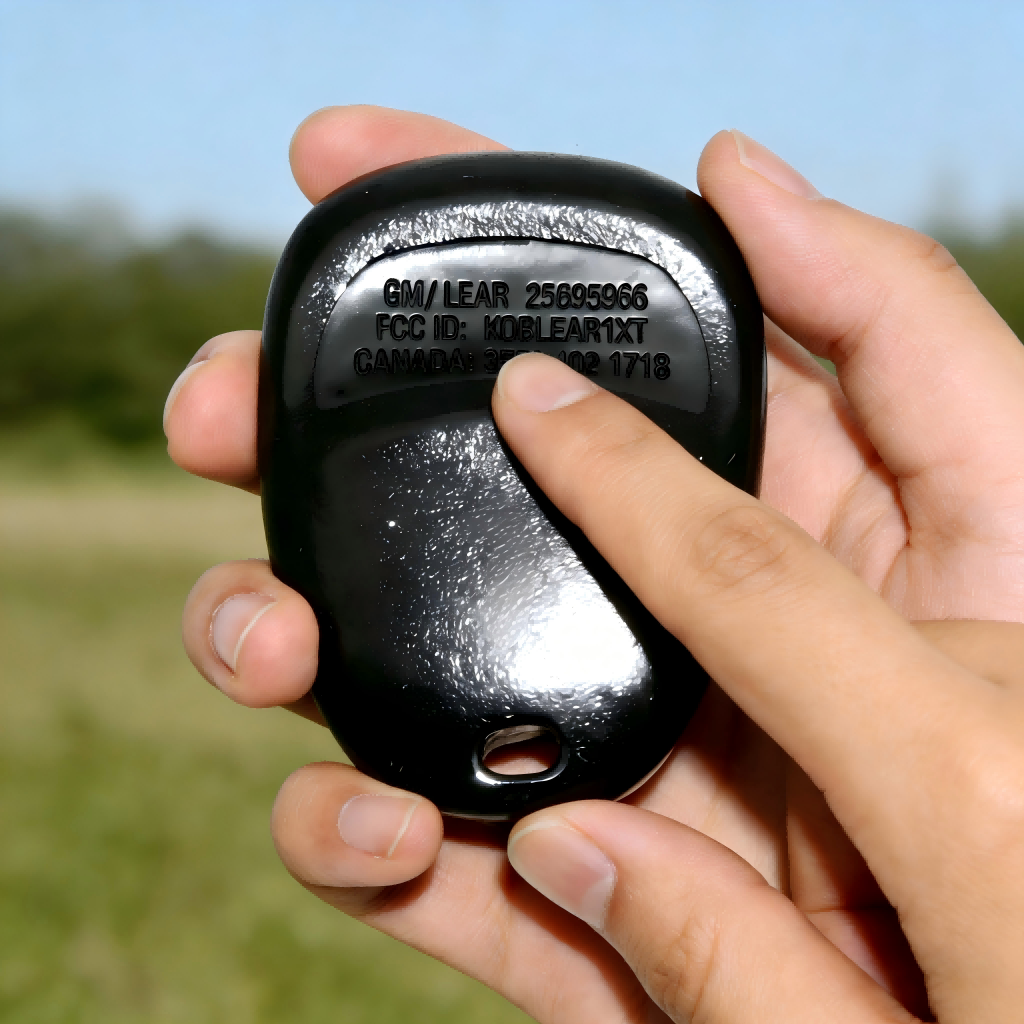
What Is an FCC ID on a Key Fob?
When you flip your key fob over and see something like “FCC ID: ABCDE12345”, that code is its FCC ID. This is a unique identifier assigned by the Federal Communications Commission to the wireless part of your car remote.
In simple terms, the FCC ID tells you:
- Who made the remote (the company)
- What radio module it uses (the specific design that sends the signal)
If your key fob can lock, unlock, or start your car wirelessly, it almost always has an FCC ID somewhere on the case, label, or circuit board.
Why Matching the FCC ID Is Crucial
The FCC ID isn’t just random manufacturing text; it dictates the specific radio frequency and transponder chip identification required to communicate with your vehicle’s onboard computer. If you ignore this code, you risk buying a remote that your car simply cannot “hear.”
At KeylessBest, we manufacture our fobs to meet exact OEM specifications, but we need that code to ensure key fob replacement compatibility. A mismatch leads to:
- Wasted Money: Buying a key that can never be programmed.
- Security Lockouts: Triggering anti-theft systems due to unrecognized signals.
- Function Failure: Buttons that don’t unlock doors or start the engine.
For you, that means:
- The remote can talk to your car correctly
- You can match a replacement remote by FCC ID to avoid buying the wrong one

How FCC ID Affects Signal, Frequency, and Range
Your key fob talks to your car using a specific radio frequency. The FCC ID is tied to that exact setup. Matching FCC IDs usually means:
- Same frequency (for example, 315 MHz or 433 MHz)
- Same modulation and coding (how the signal is “packaged”)
- Similar range (how far you can stand from the car and still lock/unlock)
If the FCC ID (and frequency behind it) don’t match your vehicle:
- The fob may not pair at all
- You might get very short range or unreliable operation
- Some buttons or features may not work correctly
FCC ID vs Part Number vs Serial Number
A key fob usually has several numbers stamped or printed on it. They are not the same thing:
| Number Type | What It Is | How You Use It |
| FCC ID | Government registered radio ID | Match wireless compatibility and frequency |
| Part number (P/N) | Manufacturer’s internal part code | Match exact style, button layout, case design |
Key point:
The FCC ID is not a serial number. It’s a type approval code, not a unique code just for your remote.
FCC ID vs. Part Numbers: Decoding the Data
When you flip over a remote or crack open a shell, you are often greeted by a confusing cluster of alphanumeric codes. Distinguishing between the FCC ID, IC Number, and Part Number (P/N) is critical because buying the wrong fob based on the wrong number often results in a key that won’t program. At KeylessBest, we categorize our inventory by these specific identifiers to ensure you get a professional-grade replacement that actually works with your vehicle.
Understanding the Difference
While these numbers often appear next to each other, they serve very different purposes regarding key fob replacement compatibility:
- FCC ID (Federal Communications Commission ID): This is the most important number for signal compatibility. It identifies the specific radio frequency (like 315MHz or 433MHz) and the transponder chip protocol used by the remote. If the FCC ID doesn’t match, the car’s receiver simply won’t “hear” the key.
- IC Number (Industry Canada): This is essentially the Canadian equivalent of the FCC ID. On many remotes, you will see the FCC ID and IC number listed together. For the purpose of finding a replacement, the IC number usually confirms the same frequency data as the FCC ID.
- Part Number (P/N): This is the manufacturer’s specific catalog number for that exact physical unit. It accounts for button configurations (e.g., trunk release vs. hatch release) and cosmetic trim.
When You Actually Need the FCC ID
You don’t need the FCC ID for everyday use, but it becomes very important when you:
- Buy a replacement key fob
- Match the FCC ID to be sure the new remote can talk to your car
- Especially important for online purchases and aftermarket remotes
- Program or reprogram a key fob
- Many DIY and professional programming guides are based on FCC ID
- Some cars require remotes with a specific FCC ID to enter programming mode
- Troubleshoot remote issues
- Verify that your remote is the correct type for your vehicle
- Confirm frequency and compatibility when range is weak or buttons don’t respond
If you only remember one rule, make it this:
For replacement and programming, matching the FCC ID is one of the safest ways to avoid a wrong or incompatible key fob.
Where Is the FCC ID on My Key Fob?
If you’re asking “where is the FCC ID on my key fob,” you’re usually looking for it to order a replacement remote, check compatibility, or troubleshoot. The FCC ID is almost always printed somewhere on the fob itself—you just have to know where to look.
Most Common FCC ID Locations on Key Fobs
On most OEM and aftermarket remotes, the key fob FCC ID will be in one of these spots:
- Back plastic cover
- Inside the battery compartment
- Printed directly on the circuit board
- On a tiny sticker or engraved area on the side or under a small cover
If you’ve recently swapped a battery like a CR2026 or CR2032, it’s worth rechecking the inside case and label areas carefully.
FCC ID on the Back Cover or Label
The easiest spot to check first is the back:
- Look for a printed label, molded lettering, or a small white sticker
- It usually starts with 3–5 letters, then numbers (example: “FCC ID: ABCDE1234”)
- It might be grouped with text like “IC,” “CE,” or “MODEL,” so read the whole block
If you’re comparing different remotes or browsing options like a replacement Cadillac key fob on sites such as KeylessBest’s Cadillac remotes, this is the exact number you’ll want to match.
FCC ID Inside the Battery Compartment
If there’s nothing obvious on the outside:
- Pop the key fob open along the seam
- Remove the battery and check:
- Under the battery
- Inside the back cover
- On a sticker in the battery tray
- The FCC ID location is often on a thin silver or white sticker that’s easy to miss
Many keyless entry remote FCC IDs are hidden here to protect the print from rubbing off in your pocket.
FCC ID Printed on the Circuit Board
If you still don’t see anything:
- Remove the battery and carefully lift the inner plastic shell if there is one
- Look directly on the green (or sometimes blue) circuit board
- The FCC ID may be:
- Printed in tiny white text
- Near the edge of the board
- Beside the largest chip or antenna area
Phrases like “FCC ID”, “CONT FCC ID”, or just a code starting with letters plus numbers usually mark the car key remote FCC number you need.
Hidden or Hard‑to‑See FCC IDs
Some remotes make it a little trickier. The FCC ID location on a key fob can be:
- On the side edge of the fob, in very small raised letters
- Under a flip‑key blade, after you open or extend the key
- Beneath a rubber button pad once the case is opened
- On a small removable cover that protects the emergency key or battery
If the print is tiny or faded, use:
- Your phone camera zoom
- A flashlight at an angle
- A simple magnifying glass
Once you’ve found and written down the FCC ID on your smart key or flip key, you’re ready to match it with a compatible replacement remote instead of guessing and wasting money on the wrong fob.
Step‑by‑Step: How I Find the FCC ID on My Key Fob
1. Check the outside of the key fob first
I always start with the easy part before opening anything. Look for:
- “FCC ID:” text on the front or back of the key fob
- A small white or silver sticker with letters and numbers
- Engraved or lightly molded text near the edge or on the back cover
Wipe the fob with a cloth so dirt doesn’t hide the FCC ID. On some OEM and aftermarket remotes, the FCC ID is tiny and sits under the branding or button icons.
2. Safely open the key fob without breaking it
If you don’t see an FCC ID outside, you’ll probably find it inside. To avoid cracking the shell:
- Look for a small notch or seam where the key fob splits
- Use a plastic pry tool or a small flat screwdriver wrapped with tape
- Gently twist at the notch—don’t force it or bend it in the middle
- Keep track of the buttons and rubber pad, they can fall out easily
If you’re working with a flip key or smart key, take your time—some have hidden clips or a sliding release.
3. Inspect the battery area and inner case
Once the fob is open, check around the battery compartment:
- Look on the plastic inside cover for “FCC ID” text
- Check any inside label or sticker around or under the battery
- Sometimes the FCC ID is printed along the inner edge of the case
Do not scratch the board or pry under components just to find the FCC ID. If needed, remove the battery gently with a small screwdriver or your fingernail.
4. Find the FCC ID on the circuit board
If it’s not on the plastic shell, it’s usually on the circuit board:
- Look for text starting with “FCC ID:” or just a string like KOBJT‑4R or similar
- Check both sides of the board—some brands print it on the back side only
- Ignore chip codes and logos; the FCC ID usually looks more like a label line than a random part number
On some European‑style or premium remotes (like certain Audi‑style keyless remotes), the FCC ID or equivalent approval number is mixed in with other regulatory text, so read carefully.
5. Use tools to read tiny or faded FCC ID print
If the FCC ID is tiny, worn, or half missing, I don’t guess—I make it easier to read:
- Use your phone camera and zoom in on the text
- Turn on the flash or use a bright LED flashlight
- Try a magnifying glass or reading glasses for small lettering
- Take multiple photos from different angles to catch faded print
If the sticker is partially damaged, photos often help you piece together the full FCC ID number.
6. Reassemble the key fob correctly
Once you’ve got the FCC ID, put everything back carefully so the remote still works:
- Make sure the battery orientation (plus and minus) is correct
- Align the rubber button pad or plastic buttons in their exact spots
- Press the two halves of the shell together until all clips snap into place
- Test every button at the car to confirm lock, unlock, and trunk/panic still respond
If you’re checking FCC IDs to match a new remote or case, keeping your original fob intact helps you compare layout and fit later, especially when ordering replacements like Jeep‑style remotes from a focused source such as our Jeep key fob collection.
Make‑Specific FCC ID Locations on Key Fobs
Finding the FCC ID on a key fob changes a bit by make. Here’s where I usually see it on the major makes in the U.S.
Toyota and Lexus FCC ID Spots
On most Toyota and Lexus keyless entry remotes:
- Standard key fobs: FCC ID is printed on the back plastic or on a small rear sticker.
- Smart keys / push‑to‑start: Often on the back housing in tiny gray or black text; sometimes hidden under a small back cover.
- Older remotes: You might need to pop the fob open—FCC ID is on the inner shell or circuit board.
Honda and Acura FCC ID Spots
Honda/Acura FCC ID locations are usually straightforward:
- Regular remotes and flip keys: Look on the back of the case near the bottom.
- Smart keys: FCC ID can be on the rear label or inside the case under the emergency key cover.
- If the back is worn smooth, open the fob and check the green circuit board text.
Ford and Lincoln FCC ID Spots
Ford and Lincoln remotes tend to keep it consistent:
- 3‑button/4‑button remotes: FCC ID is on the back face or on a black/white sticker.
- Intelligent Access / push‑button start keys: Often printed on the back or inside the battery compartment.
- Some older models have the FCC ID stamped into the inner plastic near the battery.
GM, Chevy, GMC, Buick, Cadillac FCC ID Spots
GM family brands (Chevy, GMC, Buick, Cadillac) share similar layouts:
- Oval and rectangular fobs: FCC ID is usually on the back cover just under the logo.
- Flip keys: Check near the hinge or on the inside half once opened.
- Smart keys: Many have FCC ID in the battery tray area once you remove the cover.
Nissan and Infiniti FCC ID Spots
Nissan/Infiniti “pod‑style” fobs have distinctive layouts:
- Standard smart fobs: FCC ID is often printed in tiny lettering on the back, below the logo.
- If the back is blank or worn, open the fob and look on the inside shell or circuit board.
- Some models hide it under the emergency key release cover.
Hyundai and Kia FCC ID Spots
On most Hyundai and Kia remotes:
- Remote key fobs & flip keys: FCC ID is printed on the rear label or etched directly into the plastic back.
- Proximity keys: Often in the battery compartment or on the inner back cover after you slide it off.
- Faded print? Check the PCB (circuit board) inside.
Jeep, Dodge, Chrysler, RAM FCC ID Spots
For most FCA/Stellantis brands:
- Fobik style keys (oval, integrated key head): FCC ID usually on the back face or small sticker.
- Remote head keys and flip keys: Look on the back; if not visible, open and check the inner shell.
- Newer proximity fobs: FCC ID is often in the battery area or tiny text along the edge of the case.
European Makes (BMW, Mercedes, VW, Audi) FCC ID Quirks
Euro brands sold in the U.S. sometimes use different layouts and may combine FCC with other approval codes:
- BMW: FCC ID is often on the edge or back of the fob; some require opening the back cover or sliding out the emergency key to see inner markings.
- Mercedes‑Benz: Frequently no big label—FCC ID may be in fine print inside the shell or hidden under a trim cover.
- VW and Audi: Flip keys usually have FCC ID on the rear or under the VW/Audi logo plate; smart keys may show it inside the battery compartment.
When I source or match remotes (for example, certain Isuzu‑compatible remotes listed in our OEM‑style replacement key fob catalog), I always start by matching the brand‑specific FCC ID location first. That’s what keeps compatibility issues to a minimum.
Different Key Fob Types and FCC ID Placement
Standard Remote Key Fobs (Lock/Unlock/Panic)
Most basic remotes have the FCC ID on the outside:
- Common spots
- Printed on the back plastic (raised or printed letters)
- On a small paper/plastic sticker on the rear
- If it’s not visible outside, open the case:
- Check the battery compartment
- Look on the inside of the back cover
Tip: On older GM and Ford remotes, the FCC ID is almost always on the back housing or inside the battery area.
Flip Keys and Switchblade Keys
Flip keys combine the metal blade and remote into one piece, so the FCC ID can be in different places:
- Typical locations
- Very small text on the back of the fob shell
- Inside the flip key handle, once you open the case
- On the circuit board under the battery
- Some aftermarket flip keys hide the FCC ID behind the logo badge or a decorative cap.
Warning: When opening a flip key, watch the spring mechanism so it doesn’t pop out.
Smart Keys and Push-to-Start Remotes
Modern smart keys and push‑to‑start remotes often have minimal printing, so the FCC ID is easy to miss:
- Where to look
- Tiny print on the back side near the bottom
- Under a slide-off cover (where the emergency key blade hides)
- Inside the case, usually printed on the green circuit board
- Some OEM smart keys use laser‑etched FCC IDs that are very light and require good light or a magnifier.
Tip: If you’re shopping for a replacement smart key, I always match the FCC ID and button layout before buying, especially for brands like Ford, GM, or Maserati-style smart remotes sold through specialty shops and sites like our dedicated Ford key fob replacement catalog.
Proximity and Keyless Entry Remotes
Proximity remotes (keyless entry, walk-up unlock) usually share similar FCC ID placement with smart keys:
- Likely FCC ID spots
- On the back case, in very small grey or black print
- Inside near the battery tray
- On the internal PCB (circuit board)
- Some Euro-style proximity keys may show a “Contains FCC ID” line instead of a standalone ID.
Helpful tool: A phone flashlight + camera zoom makes these tiny codes much easier to read.
Aftermarket vs OEM FCC ID Layouts
Aftermarket and OEM key fobs often use different label styles, but the FCC ID itself must match for proper compatibility in the U.S.:
| Type | FCC ID Style | Where It’s Printed |
|---|---|---|
| OEM key fob | Clean, small font, brand logo nearby | Back cover, battery area, circuit board |
| Aftermarket fob | “Compatible with FCC ID…” wording | Back shell or internal sticker |
Key things I always insist on when sourcing replacements:
- The FCC ID must be identical, not just “close.”
- The frequency and button layout should match your original.
- Avoid no‑name remotes that don’t show an FCC ID at all—those are risky for range and reliability.
If you’re unsure whether an aftermarket remote is truly compatible, use the FCC ID and your make/model/year to cross‑check with a trusted catalog or locksmith before you buy.
What If I Still Can’t Find the FCC ID on My Key Fob?
If you still can’t find the FCC ID on your key fob, don’t force it or guess. Here’s how I handle it step by step.
Why an FCC ID Might Be Missing or Worn Off
Your key fob FCC ID can be:
- Completely worn off from years of pocket wear
- Hidden under an old sticker or dealer label
- Never printed on the outside (some European or older remotes)
- Part of an inner label that fell off when the case was opened
If you don’t see “FCC ID” clearly, don’t assume the number you see is correct.
What If the FCC ID Sticker Is Damaged or Unreadable?
If the FCC ID sticker is torn, faded, or smeared:
- Use bright lighting and a magnifier to try to read faded text
- Look for partial characters and search them with “FCC ID” online
- Check the circuit board again—sometimes the FCC ID is printed directly on it
- Take a clear, close photo and zoom in digitally to make out the letters/numbers
If it’s truly unreadable, move on to other ways of matching the remote.
Check Your Paperwork, Manuals, and Packaging
You might already have the info at home:
- Owner’s manual: sometimes lists remote part numbers or FCC ID references
- Window sticker or key tag: some dealers include remote details
- Original key fob box or bag: aftermarket or dealer replacements often show the FCC ID
- Any service or repair paperwork that mentions key or remote replacement
Keep any number you find, but confirm it matches your actual remote style and buttons.
Use VIN and Vehicle Details to Match the Right Remote
If you can’t read or find the FCC ID, your VIN and vehicle info can still help:
- Have your VIN ready, plus year, make, model, and trim
- A dealer can look up the correct remote family based on your VIN
- Many online key fob stores let you search by year/make/model and then cross-check by FCC ID or part number
For example, if you drive a Toyota and can’t find the code, you can match a replacement using your year and model through a catalog like this Toyota key fob selection and then confirm compatibility.
When to Call a Dealer, Locksmith, or Key Specialist
Get professional help when:
- The FCC ID is missing, damaged, or totally unreadable
- You’re not sure between two similar-looking remotes
- Your vehicle uses a proximity or smart key (push-to-start, high security)
- You’ve already bought a remote and it won’t program
A mobile automotive locksmith is often cheaper than the dealer and used to dealing with FCC ID issues and worn key fobs.
Risks of Guessing the FCC ID or Buying “Close Enough”
Guessing here will cost you money and time:
- A remote with the wrong FCC ID or frequency usually will not program at all
- You could end up with limited function (locks work, but remote start doesn’t)
- Some “almost matching” remotes can lock you out of on-board programming or confuse your system
- Returning or reselling wrong key fobs is a hassle and often comes with restocking fees
If you aren’t sure, don’t gamble on a “close enough” listing. Match the exact FCC ID whenever possible, or use your VIN and a trusted seller or locksmith to confirm compatibility before you buy.
How to Use the FCC ID to Buy the Right Replacement Key Fob
How to read and type the FCC ID correctly
Your FCC ID is usually a mix of letters and numbers (for example: FCC ID: HYQ12BDM). When you use it online or send it to a seller:
- Copy it exactly as printed – same order, no extra spaces in the middle
- Keep letters and numbers correct (O vs 0, 1 vs I is a common mistake)
- Include the full string (not just the last few characters)
If you’re not sure, take a clear phone photo and zoom in so you don’t misread it.
Using the FCC ID with part numbers and model numbers
FCC ID tells you the radio guts are compatible. Part numbers and model numbers tell you about:
- Button layout (panic, trunk, remote start, etc.)
- Blade style (for flip keys)
- Smart key vs basic remote
Best practice when shopping:
- Match FCC ID + part number when possible
- If part number differs, make sure button layout and functions are identical
Finding compatible replacement key fobs online
Once you have the FCC ID, use it as your main search term:
- Type the full FCC ID + your car’s year, make, model into Google or marketplaces
- Check product descriptions for phrases like “FCC ID: XXXX”, “compatible with FCC ID…”
- Make sure photos match your original fob’s shape, buttons, and key blade
If you drive a Ford, Lincoln, or other major U.S. brand, you can quickly filter compatible remotes by make using a focused catalog like the Ford key fob and remote section.
Comparing OEM vs aftermarket remotes by FCC ID
When the FCC ID matches, both OEM and quality aftermarket fobs can work:
- OEM (dealer/original)
- Usually higher price
- Factory quality and feel
- Aftermarket
- Cheaper
- Quality varies by seller and brand
Non‑negotiables for me:
- FCC ID must match
- Frequency and button count must match
- Seller clearly states “must be programmed” and lists compatible vehicles
Avoiding fake or low‑quality remotes when shopping
To avoid junk remotes and headache:
- Avoid listings that don’t show the FCC ID in photos or description
- Watch out for super-cheap prices with no warranty or vague specs
- Read reviews specifically mentioning:
- Programming success
- Range and battery life
- Buttons not sticking or falling off
I recommend buying from a shop that focuses on car keys/remotes and clearly lists FCC ID + compatibility, like a dedicated car key and remote store.
Using FCC ID with make, model, and year filters
FCC ID alone is not enough. Always cross‑check with your vehicle:
- Filter by year, make, model, body style
- Confirm your engine/trim if a site or seller asks (some trims use different remotes)
- Make sure the listing says “fits [Year] [Make] [Model]” and your FCC ID is listed
If FCC ID + car details + button layout all match, you’ve got the right replacement key fob.
FCC ID Lookup and Compatibility Checks
How FCC ID Lookup Tools Work
When you’ve got the FCC ID in hand, you can use it to verify if a replacement key fob will actually work with your vehicle.
Most FCC ID lookup tools and sites work like this:
- You type in the full FCC ID exactly as printed (letters and numbers).
- The tool pulls basic specs: frequency, modulation type, power, and device category (keyless entry, remote, etc.).
- Some tools cross‑reference that FCC ID with vehicle make, model, and year and show compatible remotes.
For a deeper dive, you can also use the official FCC ID search page (fcc.gov/oet/ea/fccid) to see the original authorization, frequencies, and internal photos of the remote.
Using the FCC Database for Deeper Remote Info
If you want to really confirm what you’re buying:
- Search the FCC ID on the FCC’s own database.
- Open the “Exhibits” section to see:
- Frequency (usually around 315 MHz, 433 MHz, 434 MHz, or 902–915 MHz for U.S. key fobs)
- Internal photos of the circuit board
- Label layouts and sometimes user manuals
This is overkill for most people, but it’s a reliable way to confirm a sketchy‑looking or off‑brand remote.
Matching Button Layout, Frequency, and Functions
Even with a matching FCC ID, you still want to match:
- Button layout – Lock, unlock, trunk, panic, remote start, sliding doors, etc.
- Frequency – Must match your original remote (315 vs 433 MHz, etc.).
- Functions – A remote without remote start will not magically gain that feature just because the FCC ID matches.
Use the FCC ID as your base, then confirm the remote looks and functions like your original. For example, when I stock remotes for GM and Buick vehicles, I always list FCC ID, frequency, and button layout together so U.S. buyers know they’re getting the right style. You’ll see that same approach on specialized pages like our Buick key fob replacement catalog at KeylessBest Buick remotes.
Multiple Codes on One Key Fob
It’s normal to see more than one code printed on a key fob:
- FCC ID – What matters for wireless approval and basic compatibility.
- Part number – OEM or aftermarket internal part reference.
- IC number – Canadian approval (Industry Canada / ISED).
- Model number – Internal model ID from the manufacturer.
For compatibility, prioritize:
- Matching FCC ID
- Matching frequency and button layout
- Matching OEM or cross‑reference part number when possible
If you see two FCC IDs (usually one says “Contains FCC ID”), the important one is usually the ID tied to the transmitter module your car talks to.
How FCC ID Helps with DIY Programming Guides
Once you know your exact FCC ID, it becomes much easier to:
- Find DIY programming instructions that match your remote type.
- Watch videos and follow guides specific to your year/make/model and FCC ID.
- Avoid wasting time on programming methods meant for a similar‑looking but incompatible remote.
Many DIY programming guides and lock‑smithing blogs are tagged by FCC ID or part number. If your FCC ID matches their reference, your programming steps are far more likely to work without dealer intervention.
Programming and Pairing a New Key Fob by FCC ID
When Matching FCC ID Is Enough for Programming
Matching the FCC ID is your first green light, but not the only one that matters. In a lot of U.S. vehicles, especially older keyless entry remotes, a matching FCC ID plus the right button layout is enough to:
- Use simple on‑board programming (no special tools)
- Order a plug‑and‑play replacement fob that a locksmith or dealer can pair quickly
For most push‑to‑start and smart keys, a matching FCC ID means the remote is electronically compatible, but you’ll still need a scan tool or dealer‑level equipment to actually program it.
Common Issues With a “Matching” FCC ID
Even when the FCC ID matches, a few things can still go wrong:
- Wrong transponder type
- Some fobs share an FCC ID but use different chips for different trims or years
- Remote not previously “unlocked”
- Certain used OEM fobs can’t be re‑programmed to another car unless virgin reset
- Wrong frequency region
- U.S. vs overseas versions may look identical but won’t pair
- Partial compatibility
- Remote locks/unlocks the doors but won’t start the engine
To avoid this, always match:
- FCC ID
- Button layout
- Make / model / year
- Key type (blade, smart key, proximity, etc.)
When to Get Professional Help With Key Programming
I recommend calling a local automotive locksmith or dealer when:
- You’ve tried the on‑board instructions and the fob still won’t program
- Your car uses push‑to‑start or a proximity key system
- All keys are lost or the car won’t start after a failed attempt
- The FCC ID matches, but remote functions are inconsistent or unreliable
Guessing your way through key programming can lock out the immobilizer on some vehicles, which turns a simple replacement into a pricey service call. If you’re not sure your FCC ID and key fob are compatible, it’s usually cheaper in the long run to get a quick VIN‑based check from a locksmith or dealer before you buy or program anything.
Is FCC ID the same as a part number or model number?
No.
- FCC ID = radio approval number (regulation, frequency, compatibility).
- Part number/model number = the specific key fob design for your vehicle.
When you’re buying a replacement, match the FCC ID and the part number whenever possible.
Can I replace a key fob without knowing the FCC ID?
Sometimes, but it’s a gamble.
- Dealers can often match by VIN, but you’ll usually pay more.
- Online and locksmith orders are safer when you know your FCC ID.
If you guess, you risk getting a remote that won’t program or won’t work correctly.
Are aftermarket key fobs safe if the FCC ID matches?
Usually yes, if:
- The FCC ID matches exactly.
- The button layout and functions are the same.
- You’re buying from a reputable seller, not the cheapest random listing.
I always recommend comparing an OEM remote with the aftermarket option by FCC ID, shell style, and button count before you commit.
What if my key fob shows more than one code or number?
That’s normal. You may see:
- FCC ID
- Part number
- IC numbers
- Internal manufacturing or chip codes
Use the code labeled “FCC ID:” as your primary match, then cross‑check the part number for best compatibility.
Do all countries use FCC IDs on remotes?
No.
- FCC ID = U.S. radio certification.
- Other regions use CE, IC, RCM, etc.
If your car or key fob is from outside the U.S., you may not see an FCC ID at all, or it might be listed alongside other approval logos.
Can I have two different FCC IDs for the same car?
Yes, it happens.
- Some trims, years, or production runs use different remote platforms.
- Previous owners may have added aftermarket remotes.
Always match your replacement key fob FCC ID to the remote that actually works with your car now, not just what someone says “should” fit.
How does FCC ID affect range and performance of the remote?
The FCC ID itself doesn’t change your range, but it locks in the frequency and protocol your car expects.
- Wrong FCC ID = wrong radio spec → no response, short range, or erratic behavior.
- Correct FCC ID + healthy battery = the best possible range your system was designed for.
If your fob’s range suddenly drops and the FCC ID matches, it’s usually a battery or internal wear issue, not an FCC problem. For weak range that isn’t battery-related, I’d consider replacing the fob with a compatible unit matched by FCC ID and part number, just like we do for our own inventory and replacement recommendations.
Can I swap key fobs with different FCC IDs?
No, you generally cannot swap fobs if the FCC IDs do not match. Even if two remotes look identical on the outside, the internal technology often differs. The FCC ID confirms that the remote uses the specific radio frequency and coding protocol your vehicle’s receiver expects. For example, a 2007-2014 Chevrolet key fob with a specific ID like OUC60270 will not work on a vehicle programmed for a different code, as the car simply won’t “hear” the signal.
Is the IC number the same as the FCC ID?
The IC number vs FCC ID is a common point of confusion. They are not the same, though they serve similar regulatory purposes.
- FCC ID: Issued by the Federal Communications Commission for the United States.
- IC Number: Issued by Industry Canada.
You will often see both printed near each other on the back of the case or on the circuit board. While they represent the same device specifications, you should primarily use the FCC ID when searching for a replacement in the US market.
How do I know if my key fob is OEM?
OEM (Original Equipment Manufacturer) fobs typically feature the car brand’s logo on the shell and specific serial numbers on the PCB (Printed Circuit Board). However, “OEM quality” is what matters most for functionality. At KeylessBest, we manufacture professional-grade replacements using high-quality transponder chips (like the Xhorse Super Chip) and durable shells. Our products are designed to meet the same rigorous standards as the original parts, which is why we back them with a 2-year warranty and a 365-day return policy.
Does the FCC ID determine the frequency?
Yes, the FCC ID is directly tied to the remote key frequency, such as 315MHz, 433MHz, or 868MHz. This ID certifies that the device transmits on a specific bandwidth allowed for automotive use. If you buy a remote with the wrong ID, you might end up with a 433MHz remote when your car requires 315MHz, resulting in a complete failure to communicate. Always verify this code to ensure your 2016-2017 Ford Explorer key fob or any other replacement operates on the correct frequency for your vehicle.
