
Signs Your Ford Key Fob Battery Needs Replacement
When your Ford key fob battery starts to die, it rarely goes out all at once. Your fob usually gives you a few clear warning signs before it stops working completely. If you notice any of these, it’s time to plan a Ford key fob battery replacement.
Decreased Range and Weak Signal
If you used to unlock your Ford from across the parking lot, but now you have to stand a few feet away and press the button multiple times, that’s a classic sign of a weak battery for Ford key fob. A healthy fob should work from a reasonable distance; when the range shrinks, the battery is almost always the issue.
Slow or Inconsistent Button Response
Another red flag is lag or inconsistency:
- You press lock and nothing happens for a second or two
- Unlock works sometimes, then suddenly doesn’t
- Remote start only works after several tries
If the buttons feel “lazy” rather than instant, it’s time to change the battery in your Ford key fob before it leaves you locked out.
Dashboard Warning: “Key Battery Low”
Many newer Ford models will tell you exactly what’s going on. If you see a “Key Battery Low” or “Replace Key Battery” warning on your dashboard or instrument cluster, don’t ignore it. That message is tied directly to your Ford key fob battery, whether it’s a CR2032 Ford key fob battery or a CR2450 battery for Ford key fob.
Total Failure to Lock, Unlock, or Remote Start
If your fob suddenly:
- Won’t lock or unlock the doors
- Won’t open the trunk
- Won’t activate remote start
- Only works in the emergency backup slot
you’re almost certainly dealing with a dead Ford key fob battery. The good news: in most cases you don’t need a new fob or a dealer visit—you just need to replace the battery in your Ford key fob, which you can do yourself in a few minutes.
Tools and Materials You’ll Need to Replace a Ford Key Fob Battery
Before you start, get everything ready so you can swap the battery in your Ford key fob in one quick shot:
- Correct replacement battery (CR2032 or CR2450)
Most Ford key fobs use either a CR2032 or CR2450 lithium coin battery. Always match what’s printed on your old battery or in your owner’s manual. Using the wrong size can damage the fob or make it lose contact. - Small flathead screwdriver, coin, or plastic pry tool
You’ll need something thin to pop the key fob case open. A small flathead screwdriver works, but a plastic pry tool is safer and less likely to scratch or crack the shell. - Clean cloth or gloves to protect contacts
Use a microfiber cloth or thin gloves so you’re not touching the new battery with bare fingers. Oils and dirt can shorten battery life and cause weak connection points. - Quality lithium batteries for longer life
Always use name-brand lithium coin cells so your Ford key fob battery lasts as long as possible. Cheap cells die faster and can leak. If you’re also shopping for other remotes, you’ll notice the same principle applies across different brands, like many OEM-style keyless entry remotes we stock for other vehicles.
Identify Your Ford Key Fob Type and Battery
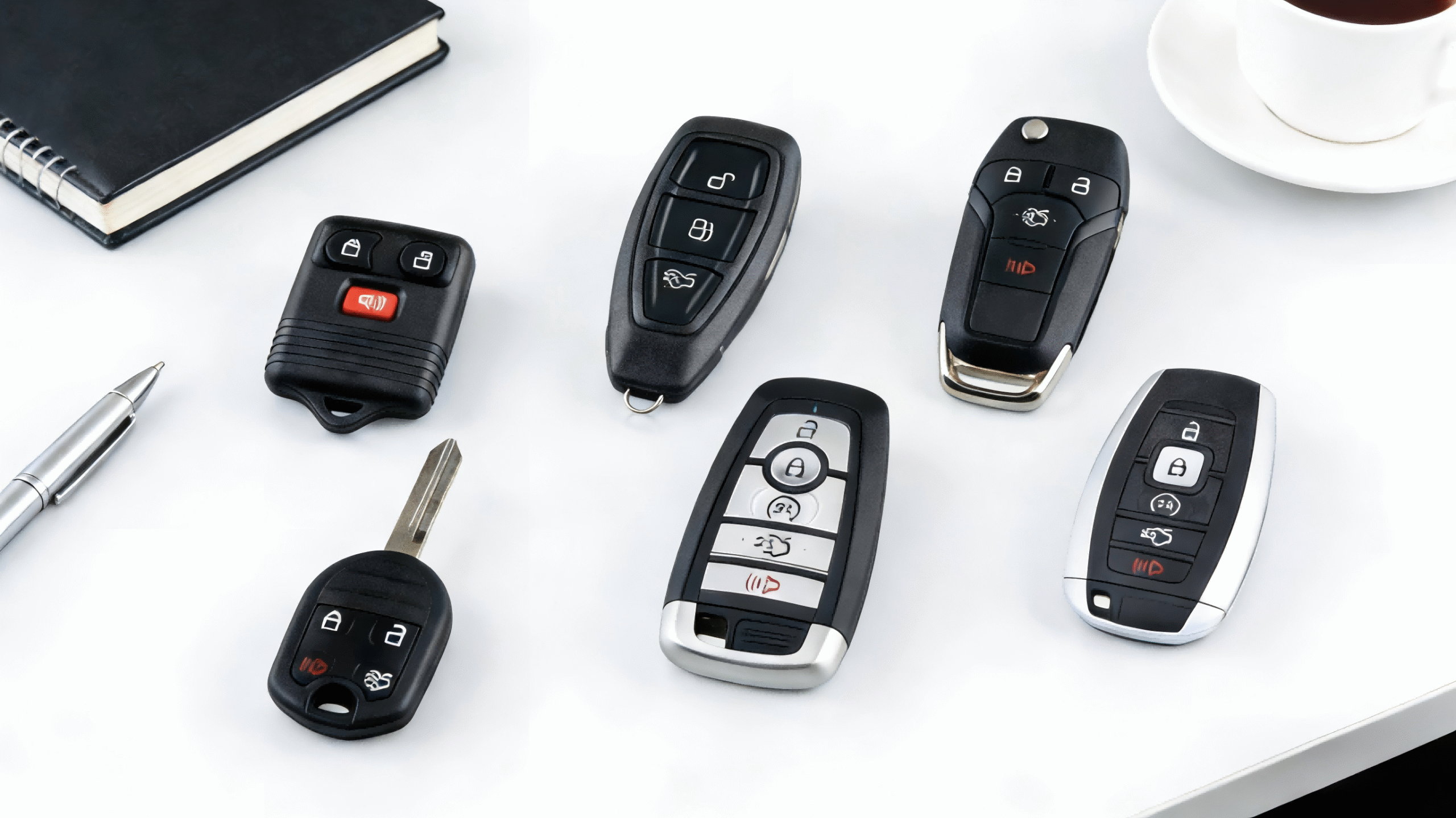
Before you replace anything, you need to know which Ford key fob you have and what battery it uses. Ford uses a few common styles across F-150, Explorer, Escape, Fusion, Edge, Focus, Fiesta, and more.
Common Ford key fob styles
Most U.S. Ford vehicles use one of these:
- Flip key fob – Metal key blade flips out with a button. Usually uses a CR2032 battery. Common on older Focus, Fiesta, and some early Escape/Fusion models.
- Keyhead remote (integrated key) – Standard metal key with lock/unlock buttons built into the plastic head. Often uses CR2032 as well.
- Intelligent Access / smart key – No traditional metal key visible, just a plastic fob with buttons for lock, unlock, trunk, remote start, and panic. Common on newer F-150, Explorer, Escape, Edge, Fusion, Expedition, Bronco, etc. Most of these use a CR2450 battery.
How to check your Ford key fob battery type
You don’t have to guess. You can confirm the correct Ford key fob battery size in a few quick ways:
- Owner’s manual – Look under “Keys and Remote Controls” or “Intelligent Access Key.”
- Old battery – Once you pop the case open, check the markings: you’ll see CR2032 or CR2450 stamped on the silver battery.
- Inside the case – Some Ford key fob shells have the battery size molded into the plastic.
- Online by model/year – Search your exact year and model (for example, “2019 Ford Fusion key fob battery” or “2017 Ford F-150 key fob battery”) to match the correct size before you buy.
Battery types by popular Ford models and years
In general (always double-check):
- Ford F-150 key fob battery
- Older models / basic keyhead: usually CR2032
- Newer push-button start / Intelligent Access: usually CR2450
- Ford Explorer key fob battery (2016+ smart key): most use CR2450
- Ford Escape, Fusion, Edge key fob battery
- Older flip/keyhead styles: often CR2032
- Newer smart keys (remote start/push-button start): usually CR2450
- Ford Focus and Fiesta key fob battery
- Flip keys and small remotes: usually CR2032
Because every brand uses slightly different shells and electronics, I always recommend sticking with quality name-brand lithium cells when you change a CR2032 Ford key fob battery or CR2450 battery for Ford key fob to avoid weak signal and early failure.
Why model-year differences matter
Ford sometimes changes the key fob design mid-generation, even if the car body looks the same. That means:
- A 2013 Ford Fusion key fob battery might not match a 2019 Ford Fusion key fob battery.
- A 2016 Ford Explorer key fob battery can differ from a 2020 Explorer, even though both are Intelligent Access keys.
- Trim levels with push-button start and remote start almost always use the larger CR2450, while base trims with a physical key may stay on CR2032.
If you’re buying in bulk to keep spares at home, separate them by model and year (for example, label a bag “2017 Ford Escape key fob battery – CR2450”) so you don’t mix sizes later. This saves returns, guesswork, and frustration when a Ford key fob won’t work because the wrong battery was forced in.
Ford Key Fob Battery Types by Model
When you’re figuring out how to replace the battery in a Ford key fob, the first step is knowing the right battery size for your model and year. Most Ford fobs in the U.S. use either a CR2032 or CR2450 lithium coin cell.
Ford F-150 Key Fob Battery (By Generation/Year)
- 2009–2014 F-150: Most standard and flip-style remotes use CR2032.
- 2015–2020 F-150 (Intelligent Access / smart key): Usually CR2450.
- 2026–2026 F-150 (newer smart keys): Still typically CR2450, but always confirm on the back of the fob or in the owner’s manual.
If you’ve got remote start or push-button start, there’s a high chance you’re on a CR2450 Ford key fob battery.
Ford Explorer Key Fob Battery (2016 and Newer)
- 2016–2019 Explorer Intelligent Access key: Usually CR2450.
- 2020–2026 Explorer smart key fobs: Typically CR2450 as well.
These newer Ford Explorer key fob battery setups use a thicker cell (CR2450) for longer life and better range.
Ford Escape, Fusion, and Edge Key Fob Batteries
For most late-model U.S. cars:
- Ford Escape key fob battery
- 2013–2019: Mostly CR2032 in flip keys, CR2450 in smart keys.
- 2020–2026: Smart keys are commonly CR2450.
- Ford Fusion key fob battery
- 2013–2016: Mix of CR2032 (older or basic remotes) and CR2450 (push-button start).
- 2017–2020: Most smart keys use CR2450.
- Ford Edge key fob battery
- 2011–2014: Standard fobs usually CR2032.
- 2015–2026: Smart/Intelligent Access keys commonly CR2450.
If you’re replacing a worn fob entirely, I recommend going with a quality aftermarket Ford-style remote from a key fob specialist instead of generic electronics sellers, similar to how we curate OEM-grade remotes in our own catalog for other brands.
Ford Focus and Fiesta Key Fob Batteries
Compact models usually stick with CR2032:
- Ford Focus key fob battery
- 2012–2018 (flip and standard fobs): Most use CR2032.
- Ford Fiesta key fob battery
- 2011–2019: Almost always CR2032 in both flip and non-flip styles.
These fobs are thin and light, so Ford favored the slimmer CR2032 Ford key fob battery to keep the size down.
How to Double-Check Before You Buy
Before you hit checkout on a Ford key fob battery replacement, do this:
- Check the markings:
- Look for “CR2032” or “CR2450” stamped on the old battery.
- Check the fob shell:
- Some Ford remotes have the battery type printed on the back.
- Check the manual or door jamb sticker:
- Confirm model year and trim, then match it to the correct battery size.
- Buy name-brand lithium:
- Stick with known brands (Energizer, Panasonic, Duracell) for stable voltage and longer life.
Once you know your size, you can buy Ford key fob batteries in multi-packs so you always have a spare on hand for your daily driver and backup remote.
Step-by-Step: How to Replace Battery in Ford Key Fob (Most Styles)
Here’s a simple DIY Ford key fob battery replacement guide that works for most modern Ford remotes (F-150, Explorer, Escape, Fusion, Edge, Focus, Fiesta, etc.).
1. Release and Remove the Emergency Key
- Look for the small release button or sliding tab on the back or side of the fob.
- Press or slide it while pulling the metal emergency key out.
- Set the key aside so you don’t lose it.
2. Find the Notch or Seam on the Key Fob
- Check the edge of the key fob shell for a small slot, notch, or visible seam.
- This is where you’ll open the case to change the battery in your Ford key fob.
3. Pry Open the Key Fob (Without Cracking It)
- Use a small flathead screwdriver, coin, or plastic pry tool.
- Insert it gently into the notch and twist with light pressure until the case starts to separate.
- Work your way around the shell so you don’t warp or crack the plastic.
4. Remove the Old Battery and Note Orientation
- Carefully lift the old CR2032 or CR2450 battery out of the tray.
- Pay attention to which side is facing up (+ side usually faces you).
- If needed, snap a quick picture so you remember the exact orientation.
5. Install the New Battery Correctly
- Slide the new Ford key fob battery into the slot in the same orientation as the old one.
- Make sure it’s fully seated and flat so you get a solid connection.
- I always recommend a quality lithium cell (Energizer, Panasonic, Duracell) for longer life.
6. Snap the Key Fob Back Together
- Align the two halves of the case.
- Press firmly around the edges until you hear/feel it click all the way around.
- Check there are no gaps and the buttons aren’t stuck.
7. Reinsert the Emergency Key and Do a Quick Test
- Slide the emergency key back into its slot until it locks.
- Stand near your Ford and test lock, unlock, and panic.
- If your Ford has remote start or trunk release, test those too to confirm your Ford key fob battery replacement was successful.
If you ever end up needing a completely new fob (for example, switching from Ford to another brand), you’d be looking at a full remote like a Jeep Grand Cherokee keyless entry fob or a Toyota Prius Prime smart key remote, which follow a similar battery-swapping process but with different shells and part numbers.
Battery Replacement for Flip-Style Ford Keys
How flip-style Ford keys open
If you’re wondering how to replace the battery in a Ford key fob with a flip blade, the first step is opening it the right way so you don’t crack the shell.
- Press the blade release button to flip the key out.
- Look along the seam near the base of the blade for a small notch.
- Use a small flathead screwdriver or coin in that notch and twist gently.
- The flip key usually splits into two halves: one with the metal blade and board, the other with the battery.
Flip-style Ford key fob battery replacement is all about working slowly so you don’t stress the hinge or the plastic.
Where the battery sits in a Ford flip key
Most Ford flip keys use a CR2032 battery, but always confirm:
- The battery usually sits in a round tray on the back half of the shell.
- Pop it out gently with a screwdriver—don’t pry under the circuit board.
- Check the + symbol on the battery and match it to the + mark in the tray so your Ford key fob battery orientation is correct.
Avoid bending the circuit board
The biggest mistake people make when they change the battery in a Ford flip key is flexing or cracking the circuit board.
Here’s how I avoid that:
- Only pry around the battery, never under the green/black board.
- Hold the key by the plastic edges, not by the board itself.
- If the board lifts, press it back down gently; don’t force it.
- Keep metal tools away from the small components on the board.
If your flip key is badly worn or cracked, it’s often smarter to move the board into a new replacement shell or full remote, like our OEM‑style 2015–2017 Ford flip key fob replacement.
Reassembling so it still flips smoothly
Once the new battery is in:
- Make sure the spring and blade are seated correctly in the hinge.
- Line up both halves of the case and squeeze them together until they snap.
- Test the flip action a few times—if it feels stiff, the case may not be fully closed.
- Stand near the car and test lock, unlock, and panic to confirm your Ford flip key battery change worked.
Done right, your flip-style Ford key should feel solid, flip cleanly, and give you full range again without needing a dealer visit.
Battery Replacement for Intelligent Access Smart Keys
If you’re running a Ford with push-button start, you’re likely using an Intelligent Access key. Swapping the battery is simple if you follow the steps and don’t force anything.
Locating the Hidden Emergency Key Release
Most Ford Intelligent Access smart keys have a small release button or sliding latch:
- Look along the side or back edge of the key fob for a small black button or slider.
- Press or slide it while pulling the metal key blade out from the bottom of the fob.
- Set that key aside—you’ll need it again when you’re done.
Opening the Smart Key Shell Safely
Once the emergency key is out, you’ll see a small slot or notch in the plastic:
- Insert a small flathead screwdriver or plastic pry tool into that notch.
- Twist gently to separate the two halves of the smart key shell.
- Don’t pry too deep—stay at the edge so you don’t scratch the circuit board or damage the rubber buttons.
Removing and Replacing the CR2450 Battery
Most Ford Intelligent Access keys use a CR2450 battery:
- Note the orientation before removal—on most Fords, the “+” side faces up.
- Pop the old battery out with a small screwdriver or fingernail.
- Wipe the new CR2450 Ford key fob battery with a clean, dry cloth (no oils, no moisture).
- Press the new battery in firmly, same orientation as the original, until it’s seated flat in the holder.
Always use a quality lithium CR2450 from a trusted brand so you’re not back inside the fob in a few months.
Extra Checks for Push-Button Start Vehicles
After you snap the shell back together and slide the emergency key back in:
- Stand near the vehicle and lock/unlock using the buttons.
- Walk a bit farther away and test again to make sure the range is normal.
- With the fob inside the car, press the brake and START/STOP button—the engine should start without any “No Key Detected” or “Low Key Battery” Ford warning.
- If the car still complains about low key battery, double-check battery orientation and that the shell is fully closed and not flexing around the contacts.
If the smart key still acts up after a new CR2450 and proper install, you’re likely looking at an internal fob issue rather than just a weak battery.
Model-Specific Ford Battery Replacement Notes
2015–2026 Ford F-150 key fob battery steps
For most 2015–2026 Ford F-150 key fobs, you’ll use a CR2450 or CR2032 battery. Here’s the quick way to change the battery in a Ford F-150 key fob:
- Slide the release on the back and pull out the emergency key.
- Use a small flathead screwdriver or coin in the seam to gently twist and open the fob shell.
- Note the + (positive) side of the old battery, then remove it.
- Drop in the new CR2450/CR2032 battery with the + side facing the same way.
- Snap the case back together and reinsert the emergency key.
- Stand near the truck and test lock, unlock, and remote start if equipped.
If your F-150 key fob still acts up after a fresh battery, the internal board is likely worn, and I recommend replacing the entire remote instead of fighting it.
2016–2026 Ford Explorer key fob battery steps
Most 2016–2026 Ford Explorer smart keys use a CR2450 battery:
- Press the small release button on the back and pull out the mechanical key.
- Insert a flat tool into the slot where the key came from and twist lightly to pop the shell open.
- Lift out the old CR2450, noting battery orientation.
- Install the new battery positive side up (check the markings in the case).
- Press the case halves back together until they click all around.
- Test lock/unlock and your push-button start; if the car doesn’t see the key, hold the fob in the backup slot (usually in the center console or under a rubber mat) and try again.
Ford Escape, Fusion, Edge smart key battery swap
Ford Escape, Fusion, and Edge smart keys are very similar, and most use a CR2032 or CR2450:
- Pop out the emergency key using the side/back release.
- Use the opening for the key blade as your pry point and carefully split the shell.
- Remove the old battery and match the part number (CR2032 vs CR2450).
- Install the new battery with the correct polarity; don’t bend the metal contacts.
- Close the key fob evenly so there’s no gap around the edge.
- Test every button: lock, unlock, trunk, remote start, and panic.
If you’re swapping to a new replacement smart key fob (not just a battery), make sure it matches your year and FCC/part number so it will program correctly with your Ford.
Focus and Fiesta older-style key fob tips
Older Ford Focus and Ford Fiesta models often use:
- Flip keys with a CR2032 battery
- Separate key + remote with a CR2032 battery
Key tips for these older-style Ford key fobs:
- On flip keys, open the back cover first, then lift the battery straight up so you don’t flex the circuit board.
- On the rectangular “oval” remotes, look for a small side notch; use a flathead to gently pry instead of forcing it.
- Always match the original battery type and thickness; using the wrong coin cell can cause weak buttons or no response at all.
If your older Focus or Fiesta remote is badly worn, cracked, or unreliable even with a fresh battery, it’s usually smarter to buy a new programmed replacement key fob than to keep trying to rescue the old shell.
Test Your Ford Key Fob After Replacing the Battery
Once you replace the battery in your Ford key fob, always test it right away so you’re not surprised in a parking lot later.
Basic lock/unlock test
Start simple, standing close to the vehicle:
- Point the Ford key fob at the car and press Lock, then Unlock.
- Make sure the doors respond instantly and the lights flash like normal.
- If the response feels slow or inconsistent, recheck the battery orientation and that the case is fully snapped together.
Check range from different distances
A fresh Ford key fob battery (CR2032 or CR2450) should give you solid range:
- Try locking/unlocking from about 10–15 feet, then 30+ feet away.
- If the range is still very short, that can point to a weak battery, cheap non‑lithium cell, or internal key fob issues.
Test all buttons: remote start, trunk, panic
Don’t stop at just lock and unlock—test every feature your Ford remote has:
- Remote start: Press the sequence your model uses (often lock, then remote start button).
- Trunk / liftgate: Hold the trunk button until it pops or lifts.
- Panic: Tap the panic button briefly to confirm it works, then shut it off right away.
If one button doesn’t work but others do, the problem is usually worn internal contacts, not the new battery.
Use the backup slot for emergency start
For push‑button start Fords with Intelligent Access:
- If the “Key Not Detected” message comes up, place the fob in the backup slot (often inside the center console or under a rubber mat marked with a key icon).
- Press the brake and hit Start. If it starts in the backup slot but not in your hand, the battery, range, or antenna in the fob may be weak.
If your Ford key fob still won’t respond properly after a correct battery change, that’s when I usually recommend moving to deeper troubleshooting or considering a full replacement key fob rather than chasing batteries.
Troubleshooting a Ford Key Fob That Still Won’t Work
If your Ford key fob still won’t work after a battery swap, walk through these quick checks before assuming it’s dead.
1. Double‑check battery orientation and size
Most Ford key fobs use a CR2032 or CR2450 lithium coin battery.
Make sure:
- The battery size matches what’s printed inside the fob or in your owner’s manual.
- The “+” side is facing the same way as the old battery (usually up, but not always).
- The battery is seated fully flat and not tilted in the tray.
A wrong size or flipped battery is one of the most common reasons a Ford key fob doesn’t work after a “replacement.”
2. Clean the contacts inside the Ford key fob
Dust, skin oil, or light corrosion can block the connection.
- Use a clean, dry cloth or cotton swab to wipe the metal contacts.
- If you see light green/white corrosion, wipe gently with a cloth slightly dampened with isopropyl alcohol, then let it dry fully.
- Don’t scrape hard with metal tools—you can damage the circuit board.
3. Try a second new battery
Even brand‑new batteries can be duds, especially cheap bulk packs.
- Swap in a second quality lithium battery from a trusted brand.
- Avoid mixing old and new batteries or “testing” used ones from other devices.
4. Give the car a short drive to clear warnings
Sometimes the car’s system needs a little time to recognize the stronger signal:
- Lock and unlock the doors a few times.
- Start the car with the key fob inside.
- Take a 5–10 minute drive and see if the “Key Battery Low” or similar warning disappears on the next restart.
5. Spot signs the Ford key fob electronics are failing
If your Ford key fob still doesn’t work after a battery change and basic cleaning, the internal electronics may be shot. Look for:
- Buttons that feel mushy, torn, or sunken.
- Cracked case, water damage, or signs it was dropped hard.
- Fob only works in the backup slot but not from a distance.
- One button works (like lock) but others don’t, even with a new battery.
In those cases, it’s usually time for a replacement Ford key fob rather than another battery.
When You Should Replace the Entire Ford Key Fob
Sometimes it’s smarter to replace the whole Ford key fob instead of fighting with another battery change.
1. Physical Damage You Shouldn’t Ignore
Replace the entire Ford key fob if you see:
- Cracked or split shell
- Worn‑through or sunken buttons
- Water damage (went through the wash, dropped in snow, heavy rain, etc.)
- Melted, swollen, or warped plastic
Once water or heavy impact reaches the circuit board, a simple Ford key fob battery replacement won’t save it.
2. Battery Changes Don’t Fix the Problem
If you:
- Installed the correct battery (CR2032 or CR2450)
- Matched the polarity (+ / –)
- Tried a second new battery from a known brand
…and your Ford key fob still has weak range, random failures, or no response at all, the internal electronics are likely failing. At that point, replacing the entire Ford key fob is the practical move.
3. Lost or Stolen Ford Key Fob
You should get a full replacement Ford key fob when:
- Your key fob is lost and you only have one left
- Your key fob is stolen and you’re worried someone could access your car
In stolen-key situations, it’s smart to have the missing fob deleted from the vehicle’s memory when the new fob is programmed.
4. Dealer vs Aftermarket Ford Key Fobs
You’ve got two main options:
- Dealer OEM key fob
- Perfect fit and full compatibility
- Usually the most expensive option
- Programming done on-site
- Aftermarket replacement key fob
- Much cheaper and still reliable if you buy from a specialist
- Quality varies, so stick with trusted key fob suppliers
- Programming can be done by a locksmith or sometimes at home depending on model
As a key fob seller, I always tell customers: a quality aftermarket Ford key fob from a specialist beats a random generic remote from a big-box store every time.
5. What to Expect When Programming a New Ford Key Fob
Programming depends on your model and year, but generally:
- Many older Fords let you program a new fob at home if you have two working keys already.
- Newer push-button start / Intelligent Access Fords often need:
- A dealer or automotive locksmith
- Special diagnostic tools to pair the new key fob to the car
- Plan on:
- Cost for the key fob itself
- A programming fee
- 15–45 minutes of time at the dealer or locksmith
Once it’s programmed, your new Ford key fob will work like factory, and with a fresh battery inside, you’re good for a few years of daily use.
How to Make Your Ford Key Fob Battery Last Longer
If you’re tired of changing Ford key fob batteries, a few small habits can stretch the life of your CR2032 or CR2450 and keep your Ford remote working strong.
Avoid Pocket Button Mashing
Constantly pressing buttons wakes the fob and drains the battery fast. To cut that down:
- Don’t toss your Ford key fob loose in a pocket with phones, keys, or coins.
- Use a belt clip, key holder, or a dedicated pocket in your bag.
- If you keep your keys in a cupholder, make sure nothing is pressing on the lock/unlock or remote start buttons.
Keep the Fob Dry and Away From Heat
Moisture and heat are the two fastest ways to kill both the battery and the circuit board:
- Keep your Ford key fob out of the washer, dryer, and rain when you can.
- Don’t leave the fob on the dash in direct sun or on a hot charger/vent.
- If it ever gets wet, pull the battery out, dry everything gently, and let it air out before reinstalling.
Store Spare Fobs and Batteries Correctly
Most Ford owners in the U.S. have at least one spare key fob; treat it right and the battery will be ready when you need it:
- Store spare Ford key fobs in a cool, dry drawer—not in the car and not in the garage window.
- Keep spare CR2032/CR2450 batteries in their original packaging so they don’t short out on metal objects.
- Don’t mix old and new batteries in the same bag; always label or separate them.
If you ever need a replacement remote instead of just a battery, I always recommend starting with a specialist search to match the exact FCC ID and blade style—using a focused search page like the one on KeylessBest’s car key and remote finder makes that part quick and accurate.
How Often to Replace Ford Key Fob Batteries
For most Ford key fobs in daily U.S. use:
- Plan on replacing the battery every 1–2 years as basic maintenance.
- Heavy use (remote start every morning, lots of lock/unlock) or extreme heat/cold may mean closer to every 12 months.
- If you start seeing a “Key Battery Low” warning, weaker range, or inconsistent response, don’t wait—swap the battery right away to avoid getting stuck.
Using a quality lithium CR2032 or CR2450 from a known brand will almost always last longer and be more reliable than bargain bulk cells.
Where to Buy Ford Key Fob Batteries and Replacements
Best places to buy CR2032 and CR2450 batteries
For most Ford key fob battery replacements (CR2032 or CR2450), I stick to:
- Big box stores (Walmart, Target, Costco) – good prices, fresh stock.
- Auto parts stores (AutoZone, O’Reilly, Advance Auto, NAPA) – easy to match the exact Ford key fob battery size.
- Reputable online shops – Amazon, and key fob specialists that sell both batteries and remotes. If you’re running a newer truck, pairing a fresh CR2450 with a compatible fob like this 2026 Ford F-150 key fob replacement keeps everything plug-and-play.
What to look for in a quality lithium battery
When you change the battery in a Ford key fob, don’t cheap out on the cell itself. Look for:
- Lithium coin cells only (CR2032 or CR2450 – matching your Ford fob type).
- Brand-name cells (Energizer, Panasonic, Duracell, Sony).
- Recent manufacture dates / long expiration dates – avoid old stock.
- Tamper‑evident, sealed packaging – cuts the risk of counterfeits or half‑dead batteries.
A good lithium Ford key fob battery usually lasts 2–4 years in normal U.S. daily driving.
Aftermarket vs OEM Ford key fobs
If your Ford key fob is cracked or failing, you’ll have two main choices:
- OEM (dealer) fobs
- Pros: Perfect fit, guaranteed compatibility, factory look.
- Cons: Higher price, usually must be programmed at the dealer.
- Aftermarket Ford key fobs
- Pros: Much cheaper, huge selection, great for spare or backup keys.
- Cons: Quality varies by seller, programming may require a locksmith or specific steps.
For U.S. drivers who want to save money but still get reliable performance, I usually recommend high‑quality aftermarket remotes from a key fob specialist instead of random generic listings.
Why buying from a key fob specialist helps
Buying from a Ford key fob specialist instead of a random marketplace listing gives you:
- Correct part matching by VIN, model, and year (no guessing on compatibility).
- Pre‑programming guidance or clear DIY steps for your specific Ford.
- Better quality control on shells, buttons, and internal boards.
- Support if your Ford key fob not working after battery change or programming issues pop up.
If you’re upgrading or replacing a lost remote, pairing a new Ford key fob with a fresh CR2032 or CR2450 battery from a specialist seller is the cleanest, most reliable way to go.
FAQs About Ford Key Fob Battery Replacement
Do I need to reprogram my Ford key fob after a battery change?
Usually, no. When you replace the battery in a Ford key fob correctly, it keeps its programming and should work right away. If it doesn’t respond at all after a fresh battery, then you may be dealing with a damaged remote and might need a replacement Ford key fob, like our 2011–2019 Ford key fob (M3N5WY8609) that’s ready to program to your vehicle: Ford key fob for 2011–2019 models.
How often should I replace a Ford key fob battery?
Most Ford key fob batteries (CR2032 or CR2450) last about 2–3 years with normal use. If you use remote start a lot or keep the fob stored near the car (constant wake-ups), expect closer to 1–2 years.
What battery does my specific Ford model use?
Most newer Ford Intelligent Access and smart keys use CR2450, while many older flip keys and basic remotes use CR2032. Always confirm by:
- Checking your owner’s manual
- Opening the fob and reading the old battery code
- Looking up your year + model + “key fob battery”
If you’re not sure, reach out with your model and year, and I’ll point you to the right Ford key fob battery.
Why does my Ford still show “low key battery” after replacement?
A few common reasons:
- Battery is installed upside down (wrong orientation)
- Wrong battery type or cheap low-voltage cell
- Terminals inside the key fob are dirty or not making good contact
- The car needs a short drive or a few start cycles to clear the “low key battery” warning
If the warning stays on after all that, the internal electronics in the key fob might be failing.
Can I drive if my Ford key fob battery is low or dead?
If it’s just low, yes—you can usually drive, but you risk it going completely dead at a bad time.
If it’s fully dead on a push-button start Ford, you can often still start the car by holding the key fob in the backup slot (usually in the center console or under a rubber pad) while pressing the brake and Start button. Replace the battery as soon as you can so you’re not stuck.
Can I change the battery myself or do I need a dealer?
You can absolutely change the battery yourself with a small flathead screwdriver or coin and the correct CR2032 or CR2450 battery. No dealer visit, no programming, no special tools needed. The dealer is really only necessary if:
- The key fob shell or buttons are physically damaged
- The circuit board is bad and you need a full replacement and programming
For most people, a simple Ford key fob battery replacement at home is all it takes to get everything working again.
