
Know Your Hardware Before Opening
Before we even touch a pry tool, we need to verify exactly what we are working with. The most common mistake isn’t breaking the plastic; it’s assuming all keys that look alike are the same. Taking a few seconds to identify your hardware prevents wasted time and ensures you don’t damage the internal components by forcing incompatible parts.
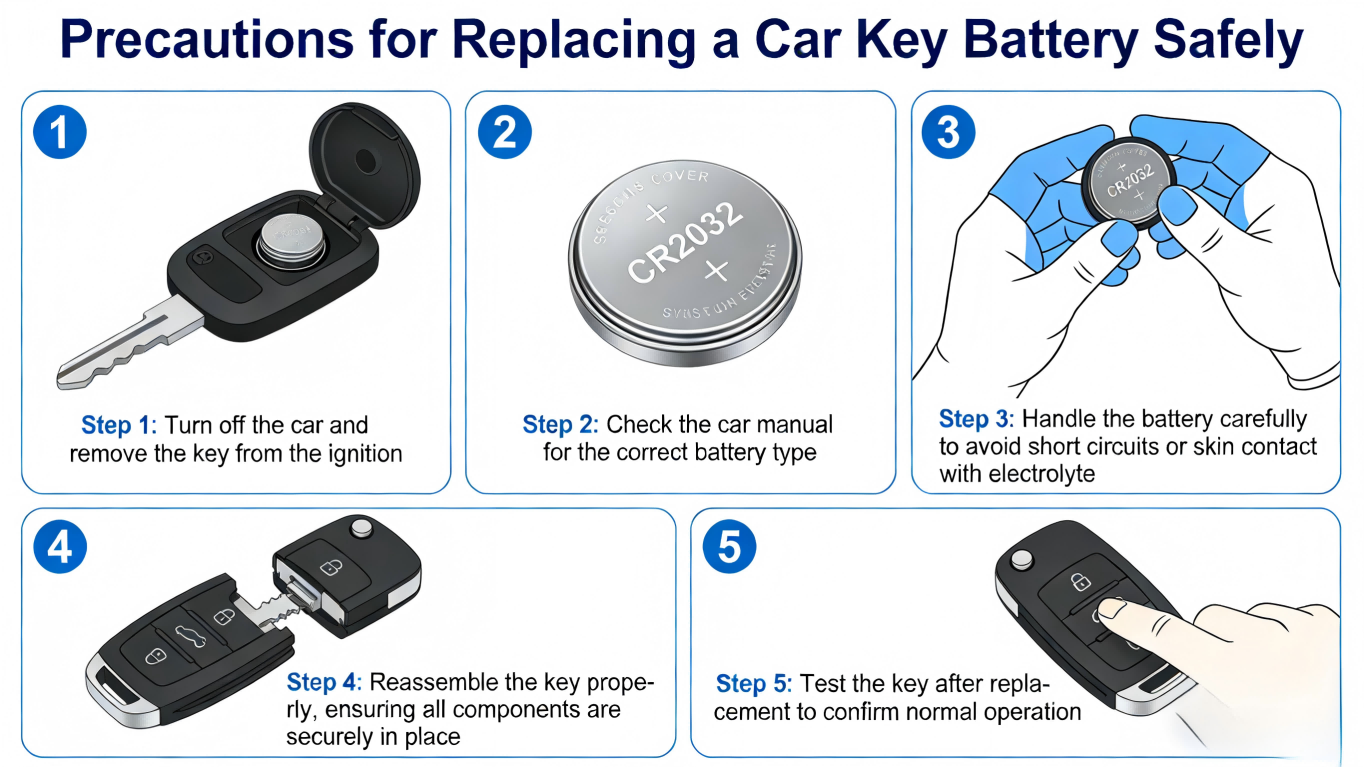
Checking FCC ID Compatibility
The FCC ID is effectively the DNA of your remote. Just because an aftermarket car key fob looks identical to your original does not mean it operates on the same signal. We always advise checking the back of your current remote or the original packaging.
- Locate the Code: Look for a string of alphanumeric characters printed on the back of the case or inside the shell (e.g., GQ43VT20T).
- Match the Numbers: If you are replacing the entire shell or electronics, the FCC ID on the new unit must match your original exactly.
- Why It Matters: Mismatched FCC IDs often result in a remote that refuses to pair, regardless of how new the battery is.
Identifying the Correct Battery Type (CR2032 vs CR2016)
Lithium coin batteries are the standard for modern smart keys, but size matters. The two most common types, CR2032 vs CR2016, are often confused because they have the same diameter (20mm) and voltage (3V). The difference lies in thickness.
| Battery Code | Diameter | Thickness | Common Issue |
|---|---|---|---|
| CR2032 | 20mm | 3.2mm | Too thick for some slots; can crack the casing if forced. |
| CR2016 | 20mm | 2.5mm | Too thin for CR2032 slots; causes intermittent connection or rattling. |
Precaution: Never force a CR2032 into a slot designed for a CR2016. Conversely, using a thinner battery in a deep slot will result in poor contact and signal failure.
Verifying Frequency Differences (315MHz vs 433MHz)
Your key fob communicates with your vehicle via a specific radio frequency. In the US market, 315MHz is standard for many older domestic and Japanese vehicles, while 433MHz (or 434MHz) is common for European imports and newer models.
- Visual Check: You cannot see the frequency just by looking at the outside of the shell.
- Internal Check: We recommend inspecting the remote’s PCB (circuit board) or the crystal oscillator if visible.
- The Risk: A 315MHz remote will never communicate with a 433MHz receiver. Always confirm the frequency specifications listed in our product descriptions match your vehicle’s requirements before attempting a swap or repair.
Mechanical Precautions: Protecting the Key Shell
When I help customers with DIY maintenance, the most common issue isn’t a dead battery—it’s a cracked case. Plastic becomes brittle over time, and applying force in the wrong spot can snap the casing before you even reach the battery. Taking a few mechanical precautions ensures you don’t turn a simple $5 battery swap into a more expensive repair.
Using the Right Prying Tool
Never use a kitchen knife or a large screwdriver to open your remote. These tools apply too much torque and can gouge the soft plastic edges. I always recommend using a prying tool for key fob maintenance, such as a plastic trim tool or a precision flathead screwdriver. If you must use a metal tool, wrap the tip in a thin layer of electrical tape or a microfiber cloth. This simple step prevents scratching the casing and keeps the seal intact for water resistance.
Locating the Correct Pry Point
Every manufacturer designs their shells differently. You need to locate the designated “release notch”—usually a small indentation on the side or the bottom seam of the fob. For instance, many Honda key fobs feature a specific slot designed for a screwdriver tip to twist and pop the shell open cleanly. Forcing the tool into the wrong section of the seam will likely break the locking tabs, preventing the case from snapping back together securely.
Handling Broken Key Shells
If the worst happens and the plastic shell cracks, don’t try to glue it back together. Superglue can leak onto the circuit board and ruin the buttons. Instead, look into car key shell replacement. At KeylessBest, we supply high-quality aftermarket shells that look and feel like the original. Replacing the shell is significantly cheaper than buying a completely new remote from a dealership, and it allows you to salvage your existing electronics.
Transferring Electronics to a New Shell
When moving components to a new aftermarket car key fob shell, precision is key. You must transfer the internal “guts”—the green circuit board and the transponder chip—without damaging them.
- Circuit Board: Lift it gently by the edges.
- Transponder Chip: If your key has a separate ceramic or glass chip, be extremely careful. These are often glued in; prying too hard can shatter the glass, rendering the car unstartable.
- Key Blade: Swap your original emergency key blade into the new shell so you don’t have to pay for cutting a new one.
Electronic Precautions: Handling the Circuit Board
Once you have the shell open, you are exposing the “brain” of your remote. The green printed circuit board (PCB) inside controls everything from unlocking your doors to allowing the engine to start. Handling this component requires care, as it is far more sensitive than the plastic casing surrounding it.
Preventing Electrostatic Discharge (ESD)
Static electricity is a silent killer for sensitive electronics. A shock you can’t even feel is enough to scramble the memory or fry a capacitor on the board. Before touching the internal electronics, touch a grounded metal object (like a door hinge or metal table leg) to discharge any static buildup from your body. This simple step provides essential electrostatic discharge (ESD) protection and ensures the remote remains functional after the swap.
Avoiding Contamination and Oils on Contacts
Your fingers carry natural oils and salts that can degrade electrical connections over time. When handling the internal components, follow these rules:
- Hold by the edges: Never touch the gold battery contact points or the flat surface of the new battery with bare skin.
- Use gloves if possible: Latex or nitrile gloves prevent oil transfer.
- Check the pads: Ensure dust or lint isn’t trapped between the rubber button pad and the board switches.
Cleaning Circuit Board Corrosion
If the old battery leaked or moisture got inside, you might see white or green crusty deposits on the terminals. This corrosion increases resistance and blocks the voltage, making a fresh battery appear dead. Perform circuit board corrosion cleaning using a cotton swab dipped in high-percentage (90%+) isopropyl alcohol. Gently wipe the contacts until they are shiny again, and let the alcohol evaporate completely before reassembly.
Protecting the Transponder Chip
On many older keys and some modern fobs, the transponder chip is a separate component—often a small glass or carbon wedge glued to the board or sitting loosely in a slot. This chip communicates with the vehicle’s immobilizer. If you are rough during the battery change, you risk transponder chip damage. If this chip cracks or falls out unnoticed, the remote functions (lock/unlock) might work, but the car will refuse to start. Always identify the chip’s location and ensure it remains secure.
Installation Precautions: Powering Up Safely
Getting the old battery out is only half the battle; putting the new one in correctly is where many DIY attempts fail. You need to handle the reassembly with care to ensure the battery replacement actually restores function to your remote.
Verifying Battery Polarity
This sounds simple, but installing the battery backward is the most common mistake I see. Coin batteries have a large flat side marked with a + sign. In the vast majority of cases, this positive side faces up (away from the circuit board). However, you should always check the plastic housing or the slot on the board for a diagram.
If you install the car key fob battery upside down, the remote will not function, and you risk shorting out the delicate components. Whether you are servicing a Ford or a Chevrolet key remote, ensuring the correct orientation is critical for the circuit to complete.
Checking Battery Terminals for Connection
Sometimes a new battery doesn’t work because the connection points are loose. The metal prongs (terminals) inside the shell can get pushed down over time or bent during the removal process.
- Inspect the prongs: Look closely to see if the metal contacts are flattened against the plastic housing.
- Adjust gently: If they look too low, use a small pick tool to very carefully pry them up slightly. They need to provide spring tension against the key fob battery.
- Secure the fit: A tight connection ensures the full smart key battery voltage reaches the transponder chip without interruption.
The Bitterant Coating Issue on New Batteries
This is a specific issue related to modern lithium coin battery safety. To prevent children from swallowing batteries, major brands like Duracell now apply a non-toxic bitter coating to the back of CR2032 cells. Unfortunately, this safety feature often causes connection problems in car keys.
The coating acts as an insulator, preventing electricity from flowing to the remote’s contacts. If you buy a battery with a “Bitter Taste” warning on the package:
- Clean the battery: Use a rubbing alcohol wipe or a cloth with a small amount of hand sanitizer.
- Scrub the surface: Vigorously wipe the negative side and the edges to remove the coating.
- Dry and Install: Ensure it is dry before placing it into the fob.
If you skip this step, your battery might be full of power, but your car key will act like it is dead.
Post-Installation Troubleshooting
You’ve swapped the coin cell, snapped the case shut, and… nothing happens. Don’t panic. This is a common scenario in the DIY world. Before you assume you bought a dud battery or broke the remote, run through a systematic troubleshooting process. Often, the issue isn’t the hardware; it’s the communication between the transmitter and the vehicle.
Re-Syncing the Car Remote
Just because the battery has power doesn’t mean the car recognizes the signal immediately. When a key fob loses power for an extended period, the rolling codes inside the transponder might fall out of sync with the vehicle’s receiver. You may need to resync car remote systems manually.
- Check the Manual: Every manufacturer has a different “handshake” procedure. It might involve inserting the key into the ignition and turning it a specific number of times or holding down the lock and unlock buttons simultaneously.
- European Models: Vehicles with complex electronics, such as those using a 2010-2018 Porsche 911 remote, often have strict re-syncing protocols that must be followed exactly to restore functionality.
- Universal Steps: For many standard keys, simply locking and unlocking the door manually with the physical key blade can sometimes wake up the system.
Testing Key Fob Signal Strength
If the sync procedure fails, you need to verify the key fob signal strength. A weak signal is often indistinguishable from a dead remote.
- LED Indicator: Most modern fobs have a small red LED. If it doesn’t flash when you press a button, the battery might be upside down, or the contacts aren’t touching.
- Range Test: If the remote only works when you are standing right next to the driver’s side window, the signal is too weak. This usually points to a low-quality battery or dirty internal contacts.
- RF Testers: Auto parts stores often have Radio Frequency (RF) testers on the counter. Aim your fob at the tester and press a button to confirm it is actually transmitting at the correct 315MHz or 433MHz frequency.
When to Replace the Whole Key Fob
Sometimes, a battery change just isn’t enough. If you have cleaned the contacts, verified the polarity, and attempted a re-sync with no luck, the internal PC board or transponder chip may be damaged. This is common if the key has been dropped in water or exposed to extreme heat.
At this stage, comparing the key fob battery replacement cost against a full replacement becomes necessary. If the internal electronics are fried, you need a new unit. We supply aftermarket car key fob solutions that are significantly cheaper than the dealership. For instance, if you are driving a newer truck and the board is dead, swapping to a completely new 2022 Hyundai Santa Cruz key fob is the only way to get you back on the road with full keyless entry capabilities. Always check your FCC ID and Part Number to ensure the new remote matches your vehicle’s system.
Frequently Asked Questions About Key Fob Batteries
Can I use a different brand of battery in my car key?
Absolutely. You are not tied to the specific battery brand that came with your vehicle from the factory. Whether it’s Panasonic, Energizer, or a generic brand, the critical factor is the battery code (like CR2032 or CR2016). As long as the voltage (usually 3V for lithium coin batteries) and physical dimensions match, the brand does not affect compatibility. However, we always recommend using high-quality cells to ensure consistent smart key battery voltage and longevity. Cheap, low-quality batteries often die faster, leading to frequent replacements.
Will my car key lose its programming if I take the battery out?
In most cases, no. Modern automotive key fobs use non-volatile memory, meaning they retain their programming data even when the power source is removed. You can typically swap the battery without needing key fob programming instructions or a diagnostic tool. However, it is best practice to complete the swap relatively quickly—within a few minutes—to avoid any potential capacitor discharge in older models. If your remote does lose sync, it usually just requires a simple manual resync procedure (like pressing the lock/unlock buttons near the ignition) rather than a full reprogram.
Why does my key fob still not work after changing the battery?
If a fresh battery doesn’t fix the issue, don’t panic. There are a few common culprits to check before assuming the remote is dead:
- Polarity: Did you install the battery upside down? Ensure the positive (+) side is facing the correct direction.
- Protective Stickers: Some new batteries have a bitterant coating or a safety sticker on the back that interferes with the connection. Wipe the battery clean before installation.
- Internal Damage: Inspect the battery contacts for corrosion or looseness.
- Worn Buttons: Sometimes the battery is fine, but the rubber pad or plastic casing is too worn to make contact with the circuit board. In this case, you likely need car key shell replacement to restore functionality without buying a whole new electronic unit.
- Signal Issues: If the red light flashes but the car doesn’t respond, you might need remote keyless entry repair or a resync procedure specific to your vehicle make.
