
Seeing that „Batterie des Schlüssels niedrig“ warning light pop up on your dashboard is stressful.
Or maybe your remote has stopped unlocking the doors on the first click.
You might think you need a trip to the dealership—and a hefty service fee—to get it fixed.
You don’t.
In fact, swapping out the power source is a simple, 2-minute repair that anyone can do at home.
In this guide, you’re going to learn exactly how to replace the battery in a Volkswagen car key fob, covering both the older Flip Keys and the newer Smart Keys.
At KeylessBest, we help drivers manage their automotive entry solutions every day, so we know exactly how to get you back on the road without damaging your fob.
Ready to skip the dealer and fix it yourself?
Let’s dive in.
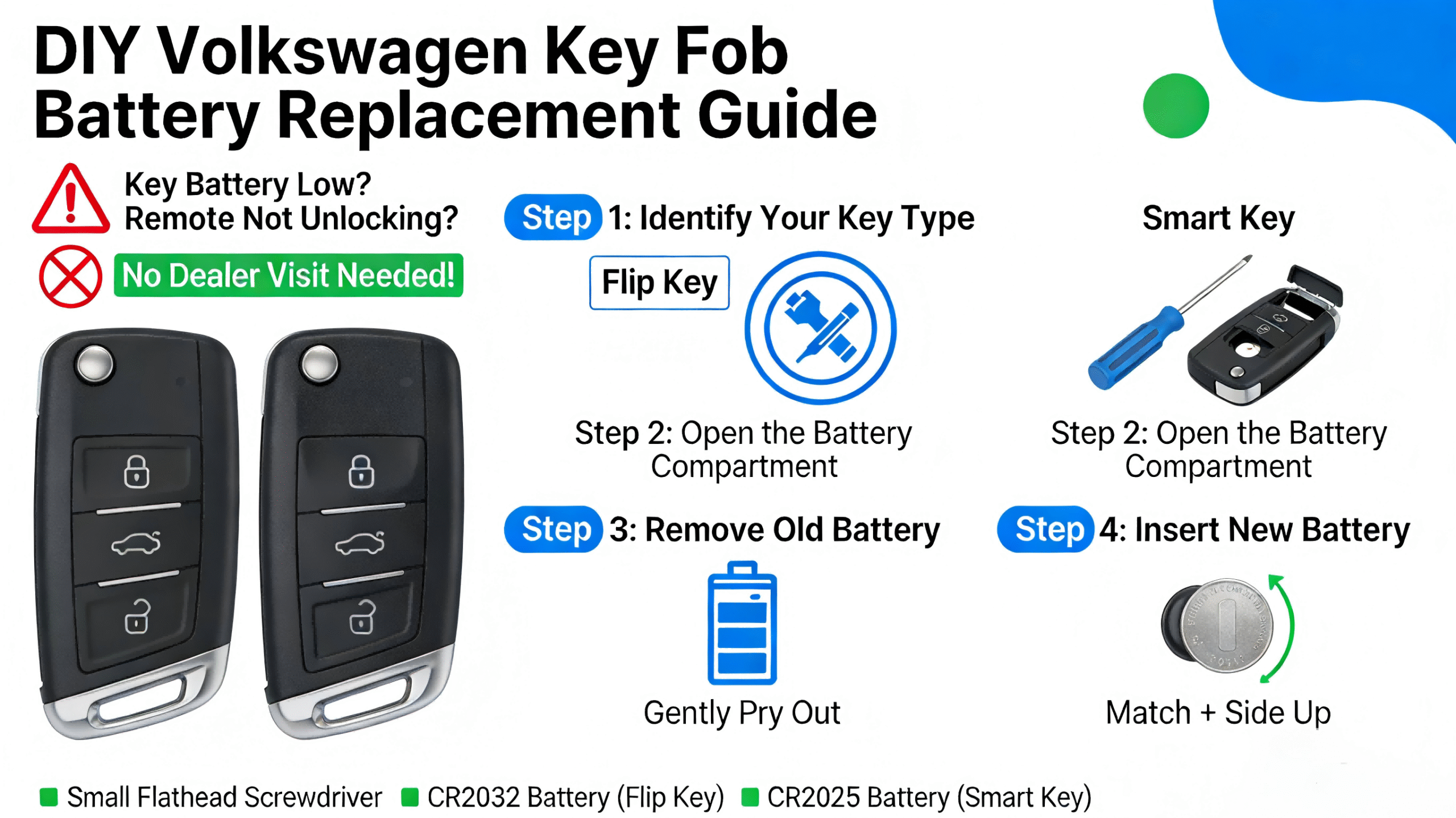
Preparation: What You Need Before You Start
At KeylessBest, we believe in saving you money by helping you avoid the dealership for simple maintenance. Seeing a “Key Battery Low” warning on your dashboard can be stressful, but learning how to replace the battery in a Volkswagen car key fob is a quick, five-minute DIY task. Before you pry anything open, we need to ensure you have the correct components to maintain the integrity of your remote.
Identify Your Key Type: Flip Key vs. Smart Key
Volkswagen generally uses two distinct styles of remotes, and the opening method differs for each:
- Flip Key (Switchblade): Common on models like the Jetta, Golf, and Beetle. This fob has a silver button that releases a physical metal key blade.
- Smart Key (Proximity Remote): Found on newer vehicles with push-button start, such as the Tiguan, Atlas, and modern Passat. The emergency key is usually hidden inside the body of the fob.
Choosing the Correct Battery: CR2032 vs. CR2026
Getting the right power source is critical. While they look similar, the CR2032 und CR2026 differ in thickness.
- Standard Choice: The vast majority of VW fobs we stock use the CR2032 3V lithium coin battery. It provides a longer life and a secure fit.
- Verifizierung: To be 100% sure, check the back of your remote for the FCC ID or open the case to read the number stamped on the dead battery. Using a thinner CR2026 in a slot designed for a CR2032 may result in poor contact and intermittent signal failure.
Gathering Required Tools
You likely have everything you need in your junk drawer. We recommend the following setup to ensure you don’t damage the plastic casing:
- Small Flat-Head Screwdriver: Used to gently pry the case apart.
- Tape (Optional): Wrap a small piece of electrical or masking tape around the screwdriver tip to prevent scratching the fob shell.
- New Battery: A fresh name-brand CR2032.
Method 1: Replacing the Battery in a VW Smart Key (Newer Models)
If you are driving a newer model like a Volkswagen Atlas, Golf, or Tiguan, you likely have the rectangular smart key with the push-button start functionality. When you notice your Volkswagen Atlas key fob not working from a distance, or the dashboard displays a low battery warning, it is time for a quick swap. This process takes less than five minutes and saves you a trip to the dealership.
Step 1: Eject the Emergency Key
Locate the small button on the side or back of the fob. Press and hold this button to release the internal metal emergency key. Pull the key ring loop to slide the metal blade completely out of the remote housing.
Step 2: Locate the Pry Point and Remove Cover
Knowing how to open a VW key fob without breaking the plastic clips is the most critical part. Look inside the slot where the metal key used to be; you will see a small indentation or pry point.
- Insert the tip of the emergency key or a small flat-head screwdriver into this slot.
- Gently twist or pry upward until the back cover pops loose.
- Remove the cover completely to reveal the battery compartment.
Step 3: Remove the Old Battery Safely
You will see the round coin battery seated in the housing. Use your small screwdriver or a paperclip to carefully slide the old battery out. Be gentle with the metal contacts to avoid bending them, as this can cause connection issues later.
Step 4: Install the New Battery (Positive Side Up)
Take your fresh 3V-Lithium-Knopfzelle (typically a CR2032) and insert it into the slot. Ensure the Positive (+) side is facing up towards you. Press it down gently until it clicks into place. If you are performing a VW Tiguan smart key battery change, the battery size is almost always the standard CR2032, but check the old battery just to be sure.
Step 5: Reassemble the Smart Key
Align the back cover with the remote housing and press them together firmly. You should hear a distinct “snap” as the clips engage. Finally, slide the emergency metal key back into its slot until it locks. Your remote is now ready for the road.
Method 2: Replacing the Battery in a VW Flip Key (Older Models)
If you are driving an older Volkswagen Jetta, Golf, or Passat, you likely have the classic “switchblade” style remote. We handle these frequently at KeylessBest, and swapping the power source is a quick DIY job that saves you from paying dealership service fees.
Step 1: Flip the Metal Key Out
Start by pressing the silver circular button on the side of the remote. The metal key blade will flip out, extending fully. This is necessary because the retracted blade often blocks the leverage point needed to open the case.
Step 2: Open the Battery Compartment
Locate the seam on the back of the fob or the indentation near the key ring loop. Using a small flat-head screwdriver or a sturdy coin, gently pry the back cover upward.
- Standard Flip Keys: The rear lid usually pops off to reveal the battery.
- Split-Style Remotes: On some older Volkswagen Passat flip key models, you may need to separate the remote into two halves (top key section and bottom button section) before accessing the battery housing.
Step 3: Swapping the Dead CR2032 Battery
Once the compartment is open, use your tool to carefully lift the old battery out. Insert your fresh 3V-Lithium-Knopfzelle—typically a CR2032—into the slot.
- Orientation: Stellen Sie sicher, dass das Positive (+) side is facing UP towards you.
- Handling: Hold the new battery by the edges to avoid transferring oils from your fingers to the contacts.
Step 4: Snapping the Key Fob Shut
Align the tabs of the battery cover with the remote casing. Press down firmly until you hear a distinct “click” or “snap,” ensuring the seal is tight to prevent dust and moisture entry. Press any button on the remote; if the small red LED light flashes, your VW key fob battery replacement erfolgreich war.
Troubleshooting: Why Is My VW Key Fob Still Not Working?
It is incredibly frustrating when you swap out the VW key fob battery and the remote still refuses to unlock the doors. Before you panic and assume the electronics are fried, run through these common issues. Most of the time, the fix is simple and doesn’t require a trip to the dealership.
Check Battery Orientation
This is the most common mistake we see. Coin batteries like the CR2032 only work one way. Open the case back up and double-check that the battery is seated correctly.
- Positive (+) Side Up: For most Volkswagen fobs, the flat side with the writing and the plus sign should be facing you.
- Seating: Ensure the battery is tucked under the small plastic tabs or metal prongs, not resting on top of them.
Remove the Protective Sticker
If you bought a fresh pack of batteries, check the back of the coin cell. Manufacturers often place a small, sometimes clear, sticker on the negative side to prevent discharge in the package. If you install the battery with this sticker still on, the electrical contacts cannot touch the metal, and the Schlüsselloseingabe-Fernbedienung won’t power up.
Clean the Battery Contacts
Over time, dust, pocket lint, or slight corrosion can build up on the metal contacts inside the remote shell. Even a tiny layer of grime can block the 3V current.
- Take a cotton swab with a tiny drop of rubbing alcohol.
- Gently wipe the metal prongs inside the battery compartment.
- Let it dry completely before reinserting the battery.
How to Resync Your VW Key Fob
Sometimes, removing the battery causes the car’s computer to lose sync with the remote’s rolling code. You may not need a full reprogram VW key after battery change procedure, but rather a quick resynchronization.
Try this simple VW resync method:
- Stand next to your vehicle with the key fob.
- Drücken Sie den Entriegeln button on the fob one time.
- Within one minute, physically unlock the driver’s door using the emergency metal key blade (hidden inside the smart key or the flip blade).
- Turn the ignition to the ON Position.
If the remote still fails to respond after these steps, the internal circuit board might be damaged. At that point, you are likely looking at a replacement. To avoid dealership markups, it is worth researching how much it costs to replace a car key fob in 2026 so you can get a fair price on a high-quality aftermarket option.
When a Battery Change Isn’t Enough: Signs You Need a New Fob
Sometimes, popping in a fresh VW key fob battery type CR2032 doesn’t solve the problem. If you have swapped the battery and the remote is still unresponsive, the issue likely lies with the hardware itself rather than the power source. Before you spend money on diagnostics, check for these physical signs of failure.
Broken Case or Buttons
Daily use takes a heavy toll on your keys. If the rubber buttons are worn down, mashed inside, or if the plastic casing is cracked, the internal circuit board becomes exposed to debris.
- Worn Buttons: If you have to press extremely hard to get a reaction, the contact pads underneath are likely failing.
- Cracked Shell: A compromised case lets in dust and moisture.
If the electronics are still functioning but the outside is trashed, you might simply need to replace VW key fob shell. This is a cost-effective repair that restores the key’s structure without requiring you to buy a whole new electronic unit.
Water Damage and Corrosion
Electronics and water do not mix. If your key went through the washing machine or fell in a puddle, internal damage is probable. Open the case as if you were changing the battery and inspect the metal contacts.
- Visual Check: Look for white or green crusty deposits on the battery terminals.
- The Fix: You can try cleaning light corrosion with a cotton swab and isopropyl alcohol. However, if the corrosion has reached the chip or the board is fried, the remote is permanently dead.
Where to Buy Replacement VW Key Fobs
If your remote is beyond repair, do not go straight to the dealership. Dealers often charge over $200 for a standard remote, plus extra for programming. I founded KeylessBest to offer a better alternative. We stock KeylessBest replacement key fobs for Volkswagen models at up to 80% off dealership prices.
When you order from us, you get:
- Huge Savings: Retail pricing that keeps money in your pocket.
- Fast Shipping: We process orders same-day or next-day so you aren’t stuck without a key.
- DIY-Programmierung: We provide free programming instructions with most purchases, allowing you to sync the new remote yourself in minutes.
- Guarantee: Every purchase is backed by a 100% Satisfaction/Money-back guarantee.
Whether you drive a Jetta, Passat, or Tiguan, getting a replacement shouldn’t be a hassle or a financial burden. Check your FCC ID and grab a replacement directly from our inventory.
Frequently Asked Questions (FAQs)
Will changing the battery reset my key programming?
In the vast majority of cases, simply swapping out the VW key fob battery will not erase your programming. The transponder chip inside the remote is designed to retain its code even when the power source is removed for a few minutes. If your remote doesn’t work immediately after the change, it likely just needs a quick resync rather than a professional reprogramming job. At KeylessBest, we include free DIY programming instructions with most purchases to help you solve these minor sync issues without a trip to the dealer.
How long does a VW key fob battery last?
Ein hochwertiges 3V-Lithium-Knopfzelle (typically a CR2032) generally lasts between three to four years. However, usage matters. If you own a newer Volkswagen with a “Smart Key” (Keyless Go/Push-Button Start), the battery may drain faster because the fob is constantly transmitting a signal to the vehicle. A common VW key fob battery low warning sign is reduced range—if you have to stand right next to the driver’s door to unlock it, it’s time for a replacement.
Can I drive my VW with a dead key fob?
Yes, you can absolutely still drive. If the Schlüssellosen-Entry-Remote-Batterie is totally dead, use the emergency mechanical key hidden inside the fob to unlock the door manually. To start the engine, hold the fob directly against the steering column (where a key slot would normally be) or press the fob against the Start/Stop button. The car’s immobilizer can read the chip at close range even without battery power. If the remote is physically damaged and the emergency start doesn’t work, you might need a full replacement, such as a 2006-2015 Volkswagen Passat CC 4-button keyless entry remote, to get back on the road safely.
